Nice post from Philip Chan on his new blog HERE This has created a good deal of interest. Hard coded behaviours are great most of the time, but annoying when it's not what you want.
A couple of years ago I developed my own little hack which in a way is the reverse of Philip's.

I was making elaborate archways for a project we were doing in Egypt. The client wanted a lot of variety in the facade, generally with an arabic flavour. We had a dozen or so "typical bays" which were scattered around in different combinations over a series of apartment blocks. I needed to embed some detail components into the families so that they would look the part in section views.

In some cases this was just a matter of indicating continuous external render where the original wall was cut away or built up.

Some of the bays had windows nested in them, some were just archways with balconies behind. I didn't want to use the windows category for the master family because I was worried about double tagging. Also archways might find their way into the window schedule if someone forgot to filter them out. The problem I faced was that the detail items sometimes showed up in inappropriate places.
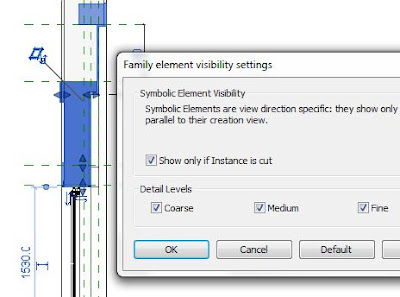
With a window family this is easily solved by checking the "only show when cut" box. In a generic model family this feature is greyed out.

You will have already guessed my solution. Swap the type to window, check the box, swap back again to GM. It stays checked even though it's greyed out. Why they don't just let us check the box in a Generic Model family I don't know.
A couple of years ago I developed my own little hack which in a way is the reverse of Philip's.

I was making elaborate archways for a project we were doing in Egypt. The client wanted a lot of variety in the facade, generally with an arabic flavour. We had a dozen or so "typical bays" which were scattered around in different combinations over a series of apartment blocks. I needed to embed some detail components into the families so that they would look the part in section views.

In some cases this was just a matter of indicating continuous external render where the original wall was cut away or built up.

Some of the bays had windows nested in them, some were just archways with balconies behind. I didn't want to use the windows category for the master family because I was worried about double tagging. Also archways might find their way into the window schedule if someone forgot to filter them out. The problem I faced was that the detail items sometimes showed up in inappropriate places.
With a window family this is easily solved by checking the "only show when cut" box. In a generic model family this feature is greyed out.

You will have already guessed my solution. Swap the type to window, check the box, swap back again to GM. It stays checked even though it's greyed out. Why they don't just let us check the box in a Generic Model family I don't know.

Just a variation on Philip's hack. (Hi Philip) Hope you find it useful.


