Showing posts with label Conceptual Massing. Show all posts

Sunday, May 10, 2020

RAILING IN PLACE


Way back in October last year, before any of us had heard of Covid19, I worked on a staircase that was causing problems for one of our Revit teams.  The stair tool is great most of the time, but sometimes the railings won’t join nicely.  In this case, the strings were twisting out of vertical as they curved around.

When setting out difficult geometry I often find that the best approach is to start with 2d drafting in plan and section views.  We tend to take orthographic views for granted in our excitement about the 3d aspect of BIM.  But descriptive geometry was actually a big breakthrough in graphic technology, more abstract in its conception than the perspective constructions that preceded it.


So I started with drafting lines in a plan view, and rationalized the geometry as far as I could.  My first instinct was to use point world (conceptual massing).  But then I realized that Swept Blends would work, modelled in place.  The paths are drawn in a plan view, picking the 2d drafting lines of my setting out.  Then the two profiles are given vertical offsets.  


I like to rough things out “by eye”, so I can quickly see how the overall shape is developing.  Later I can fine tune the heights of the various profiles in a section view to follow the curve of the nosings more closely.


I realized that I could copy-paste these elements to “the same place”, an option which always confuses beginners, but is perfect for this situation.  Take each segment of this second copy and swap in a different profile.  Very quickly you can create the glass balustrade and tubular handrail following the same, twisting path as the strings.  Now combine a quick render with a shaded view and do a bit of cleaning up in Photoshop to disguise the imperfections.  


This image was placed on a sheet as a jpeg, along with various live views of the model, and shared with the client and structural engineer.  First iteration.  


Coming back in the new year, we had some feedback.  The strings had to be more substantial and we needed to smooth out the transitions where the runs meet the landings.  This meant resorting to point world after all.  Maybe I could use the swept blends as a guide, picking along one edge to create a 3d spline that would host profiles.


That’s one approach. But I got more control by creating profiles with a built-in offset parameter.  These could be aligned to my 2d setting-out curves and inherit vertical offsets from the swept blends ... all except the “transition” profile which was raised a little to force that smooth transition.  Then you create a single loft, instead of 4 separate swept blends which share a profile where they meet each other.
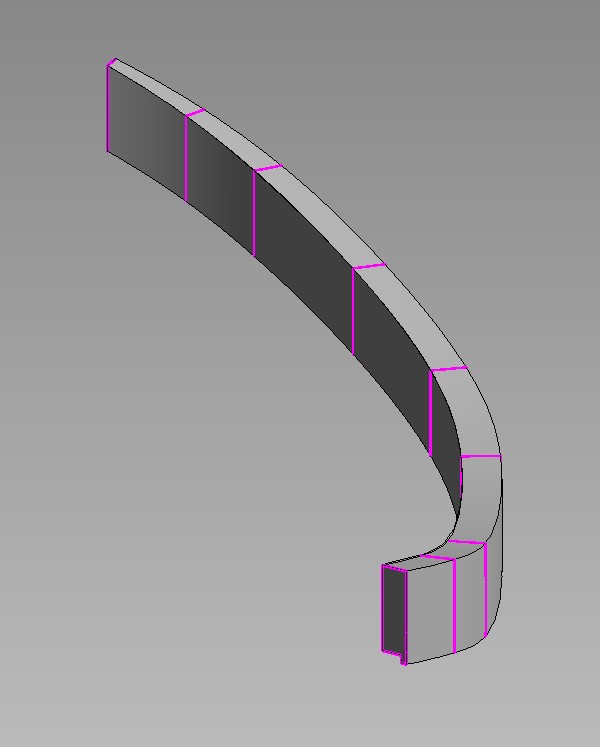


When I talk about “profiles” in a Point World context, I mean Generic Model families with a closed loop of model lines.  In this case they are drawn on a vertical work plane, with reference planes and labelled dimensions to create type and instance parameters in the usual way.  The width and height of the profile are type parameters.  The offset needs to be varied for each instance.  The notch on this profile is to allow for a soffit, most likely a stretch-fabric ceiling.


Let’s wrap this up.  Lots more work went into refining the design, especially the various junctions with floor slabs at each level.  I was using short enscape video clips to communicate the design as it developed … several clips per day.  Eventually I was asked to model the underlying steelwork to guide the structural engineer/ specialist fabricator … another interesting challenge. 


PART TWO

We’re in lockdown now, and an old friend contacted me with a “scan-to-bim” problem.  Turned out to be a stair handrail with a difficult geometry. “Aha” think I, “an opportunity to build on that work I did before, starting with some drafting in a section view (masking regions).

The first bit of String I built could have been done with swept blends.  Actually I think I had forgotten that’s what I did before, so I went straight for point world.  Just as well, because there are some portions that really need to be done as lofted forms defined by 4 or 5 profiles.


The profile is a Generic Model family, similar to the one I used before, with a somewhat fancier shape on top.  It may be that we should take a notch out of this profile where it fits over the edge of the floor slab.  Easy enough to do by editing the family and reloading.   


The string is an in-place Mass family.  I gave it an instance Material parameter so it could become red to stand out against the point cloud.  The next portion to model is quite a complex curve in 2 dimensions, formed from 5 profiles.  Each portion is sharing one profile the next piece the whole serpentine form.  So far, all the shapes have been roughed out.  There will need to be some fine tuning later on to smooth out the transitions and adjust more closely to the point cloud.


To figure out the bend where one storey meets the next. I copied the in-place family up to the next level. Changing the colour of the second copy to yellow, it is possible to turn the head of the "red serpent", up-and-around to bite the tale of the yellow one.  It seems that the floor-to-floor distance varies quite a bit, so once a typical floor is completely modelled it may be necessary to make adjustments for subsequent levels.


Now for the metal balustrade panels. The easiest one is going to be the straight portion along the landing, so let’s start with that. There is an “H” shaped extrusion, modeled directly in the host family. Next an “S-shape” created as a nested family and arrayed across the centre.  At the ends, two more nested families.  Top and bottom, in the middle, two copies of a circle family.  Nothing parametric in any of this, it would be easy enough to add some parametric capability should that seem helpful, but for now I don’t see the point.


This whole thing is going to be passed on for further development.  I just wanted to do enough to point the way.  The last piece of the puzzle in terms of tackling typical situations is a corner panel.  This is quite tricky, but can be done by setting up a diagonal reference plane to host one side. This is a loadable family and my approach is to repeatedly “have a go” ... then reload and check ... “have another go” … closer and closer.  


It requires a sharp eye and the ability to visualize 3 dimensional relationships, but can you really expect to “do BIM” without those skills?  

So there it is.  Something different after a year "slaving away" on Project Notre Dame.  I enjoyed myself.  Model in place.  You can go for weeks without using it, but sometimes it's the only way.

This "starter file" contains 3 in place mass families (in need of further refinement) There are two Generic Model "profiles" and three "rail panels". The corner panel is only half-done and there are another 3 or 4 very tricky panels to be attempted.  Good luck :)


Sunday, March 31, 2019

COMING UP ROSIE


I wanted a quick challenge to occupy my attention for two or three hours before coming back to review and complete my last post.

I started by collecting images for my classical ornament collection. This is a small but growing corner of the “archive” that syncs between one drive and my two laptops.


I can access this on my phone, flip through images I have collected over the past 25 years, zoom in and clip out details with my S-pen. This allows me to stand up and take a break from the big screen while removing productive.


The rosette is a very common motif. It can be very simple, or it can rival the Corinthian capital in complexity. The one I chose is from the Bank Stock Office, used on curved ceiling soffits as a punctuation mark, dividing border panels into a series of bays.


I made a couple of previous attempts that worked quite well, using a revolve cut by a void extrusion: starting quite simply, and gradually elaborated. The original has delicate flowing petals that represent a daunting challenge to the Revit modeller. A faithful reproduction would be serious overkill for BIM purposes, but what if I could split the difference between my dumbed down first attempts and the real life version?


It has to be point world, and probably I should start with a single leaf.  I created a parametric profile family using a Generic Model template and drawing splines as model lines. If you lock the ends of a spline to reference planes and add a labelled dimension, it will scale up parametrically, retaining the original shape.


Load this profile into a Conceptual mass family. Draw a path for a loft using another spline.  Host points, display reference planes, and host profiles. I explained this procedure a couple of posts ago.


Select the profiles and the path, then “create form”. Hey presto, a nice curvaceous leaf.  But the edges are too smooth. We need a cookie cutter to break it down into a series of lobes.


First of all I exported the geometry to SAT. Then opened it in an older version of Revit, and exploded to freeform. Upgrade the result to 2018, apply a material parameter and cut the edges with a void extrusion.


Save this as “Leaf” and insert into another family. Place four of these as if pointing to the compass, then copy rotate all 4 by 45 degrees. Offset the copies vertically. The centre piece is a revolve, cut by a void extrusion, like my earlier rosettes.


Ultimately, I decided to make the individual leaves asymmetrical, giving a slight spiral effect. There was quite a bit of tweaking (e.g. to create gaps where the leaves branch out from the centre.)

The result is a rosette of my own design, but inspired by Soane’s version. That’s exactly as it should be.  Also it is simpler than his, but more complex than my previous attempts.  Once again, “mission accomplished“ … and this could be the first of many.


There is no perfect solution to the rosette challenge.  I will probably develop several more, using different strategies, and targeting different situations.  In a large model we usually go for simplistic detailing.  In a small study of a single space we can afford more intricate elaboration.  Horses for courses.


I ended up processing various images of my creation: some Enscape3d, a bit of hand sketching ... Now, essentially I have designed a sculptural object, using Revit as my artistic medium.  So I’m back to a question that cropped up repeatedly during my pumpkin period.  “What would BIM art look like? ”


Then there’s another issue to grapple with. What is the role of sculptural objects, based on leaves and flowers, in modern architecture?  Most architects trained in Europe would shy away from direct use of classical precedent.  Maybe it’s a bit different in the US.  Meanwhile the general public seem to enjoy decorative detail with a clear connection to historical traditions.  Unfortunately most attempts to blend traditional detail with modern architectural practice are less than convincing.  It’s an interesting conundrum.
.

So why am I messing about, inventing rosettes in Revit?  Bottom line, I enjoyed myself, learned a lot and can’t wait to tackle more modelling challenges based on classical ornament.


Saturday, March 16, 2019

PUMPKINLAND REVISITED


Difficult to believe that more than 7 years have passed since my first pumpkin posts.  This was the beginning of my obsession with the Conceptual Massing Environment (I call it Point World) which continued for about 4 years, a period of intense learning. You can create some amazing geometries in Point World, but there are also significant limitations and drawbacks.


My ambition was to use these tools to create family objects: sanitary ware, furniture, classical ornament. Things with complex curvature. But there are two big issues: 1 file size, and 2 you can’t nest mass families inside ordinary families. (You can make adaptive components of many different categories, but they will not host on levels or work planes like any other "normal" Revit family.)


In the last post I looked at the potential of Onshape as a solid modelling package for tackling classical ornament, bringing geometry into family editor via ACIS (SAT). This route is also a way to overcome the two main drawbacks of point world. Which got me thinking about revisiting some of my pumpkin escapades.  The Festoon is a common decorative element in classical architecture. It derives from the garlands of leaves, fruit and cloth that used to be hung on buildings to celebrate feast days. There are endless variations on this theme, carved in stone on buildings around the world.


I was reminded of the corn cob I created for my second pumpkin adventure (Snow White meets Arcimboldo)  The overall form is a lofted surface, (formed of profiles hosted on a spline), which is patternised, and populated with a custom curtain panel.  

On Friday, in two sessions of about two hours each, I managed to apply this method to the Festoon motif, with some success. Let me walk you through it. 


The profile is an ordinary Generic Model family with model lines and labelled dimensions. This creates a half ellipse with a parameter to control the proportions.  I usually start off my parameters as single letters, so the formulas look like algebra. Then once it’s doing what I want I will rename the parameters that get exposed to end users using “plain language“  


In this case you get Bulge Factor as a type parameter. Small values will give a flatter shape.  Bulge Factor = 1, that would be a semi-circle. Radius should be an instance parameter to easily vary the size of different profiles, while maintaining the proportions.


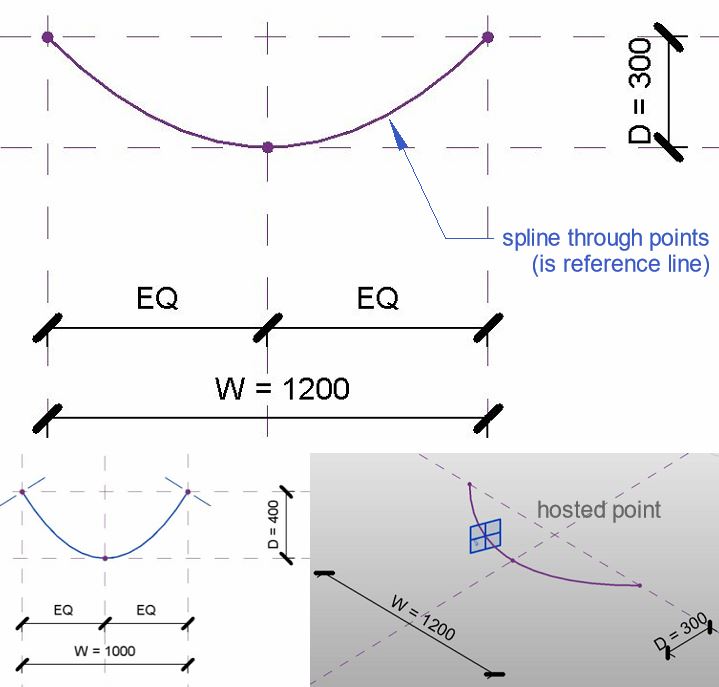
Load this into a Conceptual Mass family. Note the grey background and 3d work planes. You are in Point World.  Place 3 points, select them and choose, spline through points. You get something very much like a catenary. If you move any of these points the curve will adapt. They are “Driving Points”.  Now add more points to the line. These will be hosted points and their positions on the line are given by a parameter between 0 and 1 (Normalised Curve Parameter)  We need one in the middle and one close to each end. You can make the work planes visible (show work planes always)


Set the current work plane to one of these and place a profile on the point. You might have to rotate it 90 degrees.   For the GM profile to work in this context you need to reset two checkbox parameters from their default positions.  (Work Plane Based, & Not Always Vertical)  You may have a noticed that I initially had the Radius as a Type Parameter, so I had to change this also.  I have a little trick I like to use.  Place one point, and add a profile.  Select both and copy multiple into empty space.  Select the new points and “pick host”  I find it less tedious than repeatedly going “show reference planes always”, “set work plane” and “place instance”


Big profile in the middle, small ones at each end.  Select the 3 profiles and the spline, then hit “create form“  The result is pretty much a festoon, and it’s a surface. You can select this surface and divide it, then use those divisions to apply a pattern.


I tried the half step pattern and quickly realised that the results were not symmetrical. So best make one half of the festoon, export to SAT, and use two mirrored copies of the results.


The curtain panel family gave me some trouble. New family and choose Curtain Panel by Pattern. Select the grid and choose the type that matches your divided surface. Half Step has 6 points and 6 reference lines.


These families are supposed to keep your design intent even when they are twisted and bent to fit around a surface. So one of the tricks is to host a point on a point and give it an offset. Every point has 3 work planes (XYZ) so you have to set work plane before placing the point. The offset will push it out at right angles to this plane, depending where the point lies on a curved surface.


When I loaded my half-step panel into the surface it kept breaking so I reverted to a square grid. Finally I got some geometry to form... Looked more like a porcupine.


The curtain panels will all be different sizes, so the trick is to use a reporting parameter to drive the offsets. Something strange about this though. The values are much higher than expected. I introduced a global scale factor to adjust all the offsets with one type parameter and just tweaked until it looked right.


Eventually I settled on a panel that’s a blend between two segmental profiles. There are 3 offset  parameters, all calculated a reporting parameter which measures the width of each panel instance. I can’t understand why these offsets would be affected by the straightness of the path that the blend follows (all other things being equal)  


Maybe it’s a bug.  Or maybe I have done something weird with the reporting parameter.  Anyway, my workaround of inserting a type factor into all three equations was simple and effective.


Export to SAT and bring that back into an ordinary GM template. Add a few revolves and it’s looking half decent.  Maybe the tassles are a bit oversized in relation to the central garland.


I need a straight piece hanging down. This was pretty easy. “Save as”, the curved garland and push the middle point into line with the two ends. As discussed above, the panels become very flat. Still don’t understand that but it was simply fixed using the global scale factor “F”.


I intended to open the SAT export in 2014, scale it down a bit, explode and bring back to 2018. (This is partly about applying materials.)  


Sadly some of the panels dropped out on exploding.  So I tried another strategy.

Give the festoon a base plate to sit on, then go to a left side view and rotate the straight garland a bit so the two side rows get buried in the base. Ultimately I should go back and rebuild the massing family, reduce the width of the profiles and number of rows, the re export. But for now this works as a quick fix


Been a while since I fired up Enscape3d. Still working fine, and I fiddled about with Pixlr to come up with the final image.


Already I generated two different curved garlands plus a straight one. Once you have a concept set up in Point World creating variations on a theme is child’s play. Probably need to explore some different curtain panels next. Maybe an attempt at an oak leaf?

In conclusion, recapturing my pumpkin skills could be another way to approach some of those tricky classical motifs. Stay tuned: more to come.


Saturday, July 28, 2018

WORKING CAPITAL

I will be in St Louis in about 10 days time for the BiLT event.  I'm doing a lab where I will walk people through the system I have developed for creating modular classical columns. 
By coincidence, my good friend Marcello (Mr Simply Complex) shared a Corinthian column the other day, so I decided to download it and take a look.  It's a very nice demonstration of what can be done with conceptual massing, and ... it weighs in at under 12mb.  That may seem quite a lot, but "Point World" is notorious for generating huge files, so in my book he did a great job.


My own modular system is mostly based on the traditional family editor, and aims at "good enough" representation of classical form while allowing for all five classical orders, scalable, round and square columns, smooth and fluted shafts, full columns, half columns, attached corner columns ... there is a huge range of possibilities once you attempt to model real classical buildings (eg Project Soane)
I have two different styles of leaf at present, and neither of them looks much like his, so I immediately thought "let's canibalise those."  This took me on an interesting journey yesterday which I decided to share.


The strategy is to isolate a single leaf, export to SAT, bring back into Revit, & scale to the size I need to be compatible with my system. But there is a snag.  Revit 2017 changed the way that SAT imports are handled.


This has advantages and disadvantages.  I my case, mostly disadvantages: can't scale, can't find the CAD layers in "imports in families".  The solution is to bring it into 2016, save it, then open in 2018.  That way it gets treated as an old fashioned CAD object.


Looking closely at Marcello's leaf, it's made from two surfaces.  If it had been solid we could have exploded the SAT import in 2018 and applied a material parameter to the resulting "freeform" object.  But you can't really make this kind of shape as a solid, I've tried.


Each surface is created from a series of curved reference lines.  You select the lines and "Create Form"  The curve that defines the edge is shared be both surfaces so you get a seamless join, but at the tip and the base, the surface approximates a curve from the end points of the lines.  As a result there are very small gaps.  It's not a problem, you have to look very close to even see them, but it gives an interesting insight into how conceptual massing works.

I also noticed some strange artifacts on one of the flutes of the column.  No idea what causes this, and again it doesn't really matter, but it's worth knowing that Conceptual Massing is a bit quirky.


So I went through the SAT to 2016 to 2018 process and created families for "Leaf-A" and "Leaf-B"  These are the standard names I use to be able to swap out different styles of leaf while maintaining all the parameter settings that I use to control visibility for half-columns and corner-columns.


The result is a third variation of the Corinthian Capital for my collection, and it weights in at just less than 1mb.  There are some rather odd artefacts that seem to behave like quantum objects.  As you rotate the view they pop into existence, disappear, then reappear somewhere else.  Very odd, but let's press on.


There are a square versions of my other two capitals, and it's very easy to swap the leaves out now I have the standardised families.  But I do need a third leaf type: a corner version of Leaf-B.


This means going back to the source geometry.  For now I just did a very rough and ready fix by dissolving the geometry, deleting three of the reference lines, then remaking the surfaces.  Two of these pieces, placed at right angles make the corner leaf.  There are big open gaps at the corner, but from a distance it's fine.  I'll do a better job one of these days.


I went on to use the leaves with volutes from one of my Ionic capitals to create my first version of the Composite order.  Progress indeed!  I am characterising Marcello's leaves as "fleshy" and when you look around, you will see capitals that look a bit like this.  Probably more common, however is the "feathery" leaf style.  I have a simplified version of this at present, and decided to try to push this a bit further.  It's just one solid extrusion cut by a void extrusion at right angles.


I felt pretty good about the progress I had made in a few hours.  So I decided to revisit the column that Paul Aubin submitted as a contribution to Project Soane.  I know from talking to Paul that he was really trying to push Conceptual Massing to its limits.  The result is a pretty hefty file size.  I decided to target his scrolls which are more impressive than my highly abstracted versions, also slightly bigger, so that's another variation which does occur in reality.


Same process of going to SAT to 2016 to 2018.  Bring this into my existing scroll family, adjust the size and position as close as possible, then delete my earlier geometry and save.  Once again the standard naming convention preserves visibility controls when loaded into any of my Corinthian capitals.


Unfortunately the scrolls don't just drop into place seamlessly, so I had to go back to the original geometry again.  Once more it was a quick fix to get things working, but I'm pretty happy with the results.  Deleted a bit of foliage and extended the stem of a tendril downwards.  I'll get around to some square versions later (this one and the composite)  The great thing about a modular system is you can just keep on growing the collection and refining existing components as time permits.


Before I finish I must recommend Paul's book "Renaissance Revit", an absolute treasure trove of advanced family editor techniques.  Check him out on Lynda.com also.  One of the best Revit/BIM educators out there.

http://paulaubin.com/

And of course there is Marcello.  If you haven't seen him in action presenting a class, you are missing out, big time.  Check him out on Twitter also, or his blog.

http://therevitcomplex.blogspot.com/

If you are coming to St Louis, please come and say hello.  If you are interested in contributing to the creation of an open source library of classical elements … even better.