Showing posts with label Pumpkins. Show all posts

Monday, May 18, 2020

BIM WITCHERY BY ARCIMBOLDO (2012)

In October 2012, I set out upon my second pumpkin adventure.  The first post announced that I would be making lots of vegetables and introduced my version of the “scalable rectangular rig”.  This device delivers scalability and organic variation in one hit.  I really should go back and try to apply these ideas more directly to the world of buildings.  But maybe the irregularity we find in an old cottage is rather different from the organic variation on display in a bowl of fruit.


https://grevity.blogspot.com/2012/10/you-say-tomato.html


The next post begins with one of my polemics about “the way we build”… my attempts to “look into the soul of Homo Sapiens through the lens of our construction activity.” Then I declare my intent to record a journey whose destination is still uncertain.  Was “live streaming” a thing in those days?  Similar idea: capture the spontaneity of the moment.


I also introduced the idea of inverting the process.  Instead of carving a head out of a single pumpkin I would assemble a head from a motley collection of different vegetables.  Pushing the envelope or breaking the rules?  This post also included hand-drawn cartoons from my thesis project of 1992, having returned to university at the age of 40.


Architecture as the mirror of our collective soul.  At the time I had a very strong sense that so-called “post-modern” architecture reflected a loss of confidence and purpose in contemporary society … “anything goes” or “let’s just make fun of our heritage, rather than make the effort to try to understand it”


https://grevity.blogspot.com/2012/10/open-house.html


The doric pumpkin evolved from an idea for a “profile” that could morph between a fluted column shaft and a lobed vegetable.  The next post begins to explore variations on this theme.  What if I connect the reference points in different combinations?  


Host the results in rectangular rigs and you get sweet potatoes, capsicum, okra … all scalable and easily varied in proportions / curvature.  Early days but I was clearly on a roll.  How far could I take this theme?


https://grevity.blogspot.com/2012/10/vegetable-soup.html


Think of a vegetable. How can you make it using the idea of “mass profiles” and a “scalable rectangular rig”?  Beads on a string, profile like an eye, five copies of different size and proportion … that’s a hand made of broad beans.  


The avocado took me into the realm of revolves.  “Create Form” sometimes gives you options : do you want an extrusion or would you prefer a revolve?  I’m playing with material textures here also. It’s all about pushing the right buttons in our memory machine. The subconscious is more than capable of doing the rest.


https://grevity.blogspot.com/2012/10/mr-bean-shows-his-hand.html


Eggplants elicit more variations on the profile theme, and an interesting challenge to create the stalk. By now my regular posts had set up a dialogue with Paul Aubin which has since blossomed into a true friendship, one of several across the continents in the world of BIM enthusiasts that have become very important to me, especially in these crazy days of “shelter at home”.


https://grevity.blogspot.com/2012/10/egged-on.html


Bananas seem quite straightforward at first, but I’m interested in the fact that they come in bunches.  I used to have banana trees in my garden in Zimbabwe.  Getting into the realm of repeaters now.  Quite a long post this one, and finally I get around to assembling vegetables into a head.  Time to reveal my sources of inspiration also (archimboldo and snow white)

First attempts at a render and it is looking very empty and clunky.  Was I getting nervous?  Cold feet?  Can’t remember to be honest, but I had to keep going and hope for the best.  Just keep making more vegetables and throw them into the gaps perhaps.


https://grevity.blogspot.com/2012/10/banana-boat.html


The next post was called “putting on the style” and turned out to be a spam magnet … thousands of hits … so I changed the title to “no robots please”  The positives and negatives of our “viral age”  Not putting the genie back in the bottle now I think.  But I do hope we can outlive the rabid polarisation and politicisation that digital interconnection seems to have spawned.


I was actually thinking about “stylisation”, meaning the process of simplifying forms down to an essence that sticks in the brain.  “Archetype” is a related concept. How do you capture “just enough” random variation to make something appear naturally organic?


The last part of the post sees me trying to feed these ideas back into the world of architecture.  I settle on a door handle by Victor Horta.  Very much a stylised version, but it made me think about a different sort of rig, based on a tetrahedron.


https://grevity.blogspot.com/2012/10/putting-on-style.html


What a journey this was.  Just kept on going.  Now comes the post that became a “Vasari talk” later on.  Green Onions and Wig Hat are two musical references sparked off by my decision to use Spring Onions as a substitute for strands of hair. 


Looking back the analogy between biological evolution and the gradual unfolding of design ideas is very strong.  Take something that was developed for one purpose, duplicate it and adapt it to a new use.  Over time this produces a surprisingly rich complexity of forms.

The render still looks empty, but a bit less clunky.


https://grevity.blogspot.com/2012/10/green-onions-wig-hat.html


This is supposed to be a Halloween picture, so “scary” is the operative word.  Let’s add teeth and a grasping hand.  Each new challenge is an opportunity to explore a slightly different take on the techniques previously developed.


Happy to see the use of orthographic views to understand the relationship of the different parts. For me it’s a big part of the BIM advantage.  We always go on about data, and of course that is important, but the integration of orthographic and 3d views into a single package generates an extra layer of understanding that is often undervalued.


https://grevity.blogspot.com/2012/10/jack-tomato-stalk.html


Populating divided surfaces with pattern-based panels and applying randomised values to instance parameters.  The maize cob was intentional, the pine cone a happy accident.  Life is usually a mixture of both, if only we can get the balance right.  Artists are very familiar with this balancing act.  Someone like Jackson Pollock took it to an extreme perhaps, arguably a bit of a dead end because of that.  But any artist who observes the play of light and shade in the real world, or interprets the natural shapes of acanthus leave in a stylised way is engaged in balancing accident and intentionality.

Often this is done at a subconscious level of course.  Arguably many of the best accidents occur inside our pre-conscious brains.  Isn’t this what we mean by “inspiration”?  Surely it doesn’t refer to a carefully calculated, predefined process.


https://grevity.blogspot.com/2012/10/amaizing-grace.html


12 posts in one month!  How on earth did I manage that.  Oh to be 60 again.  Time was running out though and I needed to throw a lot more stuff into the picture frame (including a couple of picture frames, of course)  Relying on my subconscious sense of composition here, those teenage years spent painting whenever I got the chance.  


“What is this thing called BIM … does it have a soul, can it touch my heart?”

Right at the end there was a frantic effort to systematise and catalogue the stuff I had created during my journey, especially the “profiles”.  Putting these on sheets was partly a justification for doing things “the BIM way” as opposed to say Max & Photoshop.  But it’s also a really valuable resource for me, 7 or 8 years later, reflecting on what I achieved and how it might contribute to future work.


https://grevity.blogspot.com/2012/10/rapid-fire.html


So the last image is not a blog post, it’s just the folder with the “deliverables” that constituted my submission for the Parametric Pumpkin Competition.  Thanks once more to Zach Kron for unleashing the hidden demons inside of me.  This was number two in a series of four adventures that I undertook using his annual Halloween event as an excuse.  In many ways they were the precursors to Project Soane & Project Notre Dame.  I’m not sure they would have developed as they did without the Pumpkin series.  So it’s appropriate that this retrospective post began with a reference to “the way we build”


Tuesday, October 29, 2019

DORIC PUMPKINS REVISITED


This is the second in a series of posts looking back over nine years of blogging.

An awards dinner, an honourable mention and I seem to remember getting rather drunk with on of the partners. Our submission for the BIM category was rather too complex and unconventional to be an outright winner. But the project was a tremendous learning experience for me, which is surely the greatest prize. Topography is another of those love-hate features in Revit.  One day we will have a better solution, but you can actually do an awful lot with Revit topo, as I found on this project, it just takes time. 


https://grevity.blogspot.com/2011/09/first-principal.html


I had a young Australian friend in the office around this time.  He was a design architect who was the value of starting early with Revit.  Sadly he was a bit out of step with senior management and eventually he moved on.  But for a while we had some great discussions and I tackled all kinds of challenges that he presented to me.  In this post I showcased some renderings that he did in his spare time for a private client, all from Revit, some with the inbuilt render engine, others using the link to Max. 


https://grevity.blogspot.com/2011/09/beam-me-up-scotty.html


I picked up some tricks for processing Revit output in Photoshop quite early on via the internet, and over the years have tweaked and varied these processes in different ways.  This post covers several useful techniques using real life examples from my day job.  The most fundamental trick is to export a hidden line view and a render to the same width ( in pixels) and put them on different layers.  Then you can use various blending and masking techniques to make the image resemble a hand-drawn perspective.  This is another example of giving our minds just the right cues to jump to a useful conclusion.  We are always favourably impressed with a well-drawn sketch from real life.  It gives us a warm and fuzzy feeling, connects to works of art in the labyrinth of connected neurons within the cerebral cortex.  Most of this is subconscious and all the more effective as a result. 

If you can manipulate an image from the model in 5-10 minutes then it is really worth doing.  If it takes much longer than that, then the pain of having to do it again when the model changes becomes too much to bear.  That’s my rule of thumb.


https://grevity.blogspot.com/2011/09/image-manipulation.html


Archicad.  I played around with early versions before Revit even existed, and could easily have ended up a devoted user.  But life took a different turn and I ended up in a Revit office.  There was a seminar about this time that advertised itself as a BIM event.  In the end it was exclusively about Archicad, although this wasn’t made at all clear in the blurb.  No big deal, it was quite interesting, and I find the animosity thing between fan bases very boring.  There are pros and cons.  I have heard different opinions from believable sources.  In the end I think it’s about what you can do with the software, most of all what IDEAS you have to share (design ideas, historical ideas, interpretations)  Michelangelo was not defined by the quality of his chisels or his paint brushes. His technical skill was important, but much less significant that his vision.  Can you express yourself with BIM?  Do you have something to say?


https://grevity.blogspot.com/2011/09/anyone-for-bimicad.html


Another interaction with a supplier at a CPD session.  Stamped concrete is an interesting technology for quickly and cheaply mimicking natural materials with complex textures and variability.  I tried to convey to this company rep how useful it would be if they learnt how to set up Revit materials for their wide range of finish options.  She showed some interest but didn’t really pick up on it like I had hoped.  One day.


https://grevity.blogspot.com/2011/09/stamp-collection.html


This post is centred around my decision to share a bunch of furniture families.  I’m a firm believer in open sharing of content.  I had been to Uganda a little while before and wanted to use the post to express some broader thoughts about fair trade and the enormous variations in lifestyle and living standards between different global regions.  I don’t believe in simplistic solutions or in blame culture/virtue signaling.  I think we need to be honest and aware of reality.  Do our best to interact positively with the world around us.  Cherish the good things in the societies we inhabit.  I feel privileged to have lived on three continents for over a decade each.  Been a hell of a ride :)


https://grevity.blogspot.com/2011/10/come-shop-with-me.html


Ceilings.  Another bug-bear.  How do you do coffers?  There is a hack that allows you to smuggle system categories into family editor, but it’s a bit suspect.  Would be nice if it loadable families could be assigned to a ceilings category.  Anyway this is a family I developed around that time.  Ceiling-hosted, cuts a hold and inserts a coffer, type in the width, length and height, specify the lighting cornice moulding profile.  Haven’t used it in a while.  Front of house has been handled by a separate sub-consultant on most of my recent jobs.


https://grevity.blogspot.com/2011/10/hitting-ceiling.html


And here comes the pumpkin experience.  This was another of those remarkable coincidences that keep cropping up in my life. I received a suggestion from a follower for a scalable profile for the doric columns in my “lunch with the gods” post. It was tour-de-force with formulae galore and using point world.  A light bulb moment occurred, and I came up with my own solution, which just so happened to allow for the profile to turn itself “inside out”.  A second light bulb popped up and told me that an inside out Doric Column was in fact a pumpkin.  All this as Zach Kron was announcing his annual competition.  A bit of fun which had produced some fascinating entries over the past 3 years.


https://grevity.blogspot.com/2011/10/exploring-pumpkinland.html


Light bulb number 3 said to me “why don’t you do your competition entry as a series of live blog posts?” … a feat of reckless bravado that served as an incredible motivator for me as I ramped up the complexity of my submissions for 4 competitions in a row.


Now my “way we build” hat said “this is a perfect opportunity to model Adolf Loos entry for the Chicago Tribune competition, which took the form of a giant doric column.  So that was the basis of my second post.  Amazingly I have never gone back to develop this further.  But it was a good exercise, using wall-by-face to convert a massing object into a real building.  Along the way, I had already discovered what an astounding array of forms my parametric family was capable of producing if I added a parameter to swap out different profiles.  This on top of using the same family for the whole building and the three storey columns framing the entrance.


https://grevity.blogspot.com/2011/10/when-is-pumpkin-not-pumpkin.html


Post 3 accepted the challenge of making the pumpkin version more organic.  Allow a couple of the lobes to have a greater “bulge factor” and apply a textured material.  Not bad.  Render it up, add a bit of cinderella stuff in the background.  Quite a story line developing here.  Why did I add the 4 points of Le Corbusier?


https://grevity.blogspot.com/2011/10/going-organic.html


Now once you have an organic thing going, there are all kinds of possibilities.  It could be more of a gourd than a pumpkin or it could even be a mushroom.  Suddenly we have switched from Cinderella to Alice in Wonderland.  I was getting very interested in blurring the boundaries between BIM and fantasy, BIM and art.  Pushing back against the “nerd” label I suppose.


https://grevity.blogspot.com/2011/10/mushrooms-mice.html


I explored methods for making the pumpking hollow, and this led to even more metamorphoses.  You could turn it into a 1970s lamp shade, or some kind of jellyfish, maybe even a lemon squeezer.  Self-intersecting geometry even seemed possible without breaking the family.


https://grevity.blogspot.com/2011/10/into-void.html


My final post was a set of conclusions and reflections.  What had I achieved?  What were the limitations?  How could it be made more user friendly.  What were some of the potential applications of the ideas that I had explored?  Then I cleaned up the different versions of the family, popped them into a project in an orderly manner and … submitted.

As an aside, this was an early example of my attempts to bring freehand sketching back into my work process.  I think I drew these on paper and then coloured them up in photoshop, but I did by a funny little device called an inkling around that time also. 


https://grevity.blogspot.com/2011/10/pumpkin-postscript.html


It was an incredible year for submissions.  Marcello also tackled metamorphosis, but in a way that was more “Hammer Horror” than “Walt Disney”  Phillip Chan designed a pumpkin-based apartment block.  So I was thrilled to stand on the (virtual) podium alongside these two giants who have since become good friends. 


https://grevity.blogspot.com/2011/11/winning-ways.html


That’s chapter 2 of my "blog story" folks and I'm feeling quite nostalgic.  A year on from my very first post and a head bursting with ideas and motivation.  Where to next?

Saturday, March 16, 2019

PUMPKINLAND REVISITED


Difficult to believe that more than 7 years have passed since my first pumpkin posts.  This was the beginning of my obsession with the Conceptual Massing Environment (I call it Point World) which continued for about 4 years, a period of intense learning. You can create some amazing geometries in Point World, but there are also significant limitations and drawbacks.


My ambition was to use these tools to create family objects: sanitary ware, furniture, classical ornament. Things with complex curvature. But there are two big issues: 1 file size, and 2 you can’t nest mass families inside ordinary families. (You can make adaptive components of many different categories, but they will not host on levels or work planes like any other "normal" Revit family.)


In the last post I looked at the potential of Onshape as a solid modelling package for tackling classical ornament, bringing geometry into family editor via ACIS (SAT). This route is also a way to overcome the two main drawbacks of point world. Which got me thinking about revisiting some of my pumpkin escapades.  The Festoon is a common decorative element in classical architecture. It derives from the garlands of leaves, fruit and cloth that used to be hung on buildings to celebrate feast days. There are endless variations on this theme, carved in stone on buildings around the world.


I was reminded of the corn cob I created for my second pumpkin adventure (Snow White meets Arcimboldo)  The overall form is a lofted surface, (formed of profiles hosted on a spline), which is patternised, and populated with a custom curtain panel.  

On Friday, in two sessions of about two hours each, I managed to apply this method to the Festoon motif, with some success. Let me walk you through it. 


The profile is an ordinary Generic Model family with model lines and labelled dimensions. This creates a half ellipse with a parameter to control the proportions.  I usually start off my parameters as single letters, so the formulas look like algebra. Then once it’s doing what I want I will rename the parameters that get exposed to end users using “plain language“  


In this case you get Bulge Factor as a type parameter. Small values will give a flatter shape.  Bulge Factor = 1, that would be a semi-circle. Radius should be an instance parameter to easily vary the size of different profiles, while maintaining the proportions.


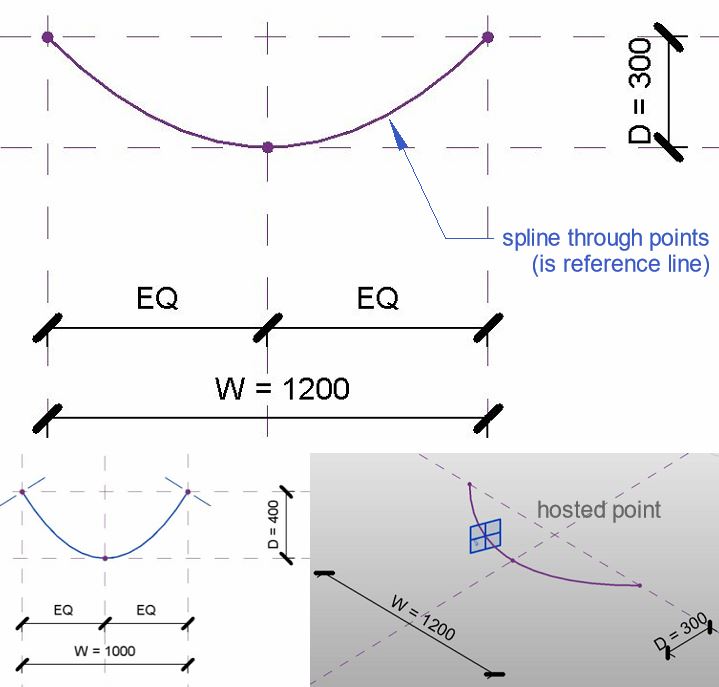
Load this into a Conceptual Mass family. Note the grey background and 3d work planes. You are in Point World.  Place 3 points, select them and choose, spline through points. You get something very much like a catenary. If you move any of these points the curve will adapt. They are “Driving Points”.  Now add more points to the line. These will be hosted points and their positions on the line are given by a parameter between 0 and 1 (Normalised Curve Parameter)  We need one in the middle and one close to each end. You can make the work planes visible (show work planes always)


Set the current work plane to one of these and place a profile on the point. You might have to rotate it 90 degrees.   For the GM profile to work in this context you need to reset two checkbox parameters from their default positions.  (Work Plane Based, & Not Always Vertical)  You may have a noticed that I initially had the Radius as a Type Parameter, so I had to change this also.  I have a little trick I like to use.  Place one point, and add a profile.  Select both and copy multiple into empty space.  Select the new points and “pick host”  I find it less tedious than repeatedly going “show reference planes always”, “set work plane” and “place instance”


Big profile in the middle, small ones at each end.  Select the 3 profiles and the spline, then hit “create form“  The result is pretty much a festoon, and it’s a surface. You can select this surface and divide it, then use those divisions to apply a pattern.


I tried the half step pattern and quickly realised that the results were not symmetrical. So best make one half of the festoon, export to SAT, and use two mirrored copies of the results.


The curtain panel family gave me some trouble. New family and choose Curtain Panel by Pattern. Select the grid and choose the type that matches your divided surface. Half Step has 6 points and 6 reference lines.


These families are supposed to keep your design intent even when they are twisted and bent to fit around a surface. So one of the tricks is to host a point on a point and give it an offset. Every point has 3 work planes (XYZ) so you have to set work plane before placing the point. The offset will push it out at right angles to this plane, depending where the point lies on a curved surface.


When I loaded my half-step panel into the surface it kept breaking so I reverted to a square grid. Finally I got some geometry to form... Looked more like a porcupine.


The curtain panels will all be different sizes, so the trick is to use a reporting parameter to drive the offsets. Something strange about this though. The values are much higher than expected. I introduced a global scale factor to adjust all the offsets with one type parameter and just tweaked until it looked right.


Eventually I settled on a panel that’s a blend between two segmental profiles. There are 3 offset  parameters, all calculated a reporting parameter which measures the width of each panel instance. I can’t understand why these offsets would be affected by the straightness of the path that the blend follows (all other things being equal)  


Maybe it’s a bug.  Or maybe I have done something weird with the reporting parameter.  Anyway, my workaround of inserting a type factor into all three equations was simple and effective.


Export to SAT and bring that back into an ordinary GM template. Add a few revolves and it’s looking half decent.  Maybe the tassles are a bit oversized in relation to the central garland.


I need a straight piece hanging down. This was pretty easy. “Save as”, the curved garland and push the middle point into line with the two ends. As discussed above, the panels become very flat. Still don’t understand that but it was simply fixed using the global scale factor “F”.


I intended to open the SAT export in 2014, scale it down a bit, explode and bring back to 2018. (This is partly about applying materials.)  


Sadly some of the panels dropped out on exploding.  So I tried another strategy.

Give the festoon a base plate to sit on, then go to a left side view and rotate the straight garland a bit so the two side rows get buried in the base. Ultimately I should go back and rebuild the massing family, reduce the width of the profiles and number of rows, the re export. But for now this works as a quick fix


Been a while since I fired up Enscape3d. Still working fine, and I fiddled about with Pixlr to come up with the final image.


Already I generated two different curved garlands plus a straight one. Once you have a concept set up in Point World creating variations on a theme is child’s play. Probably need to explore some different curtain panels next. Maybe an attempt at an oak leaf?

In conclusion, recapturing my pumpkin skills could be another way to approach some of those tricky classical motifs. Stay tuned: more to come.


Tuesday, October 28, 2014

TICK TOCK (AKA THE LAST POST)

Counting down to submission and as always there is not enough time to do pursue all the ideas that jostle for my attention.  It's been another roller coaster ride and immensely rewarding for me. Thanks again to Zach for hosting this competition.

I must also thank Arezoo who has been helping me to assemble a design report, to package up my adventure in the form of a book which will form the main part of my submission.  For this post I will be taking snapshots from that report.  I don't have time to continue recording my process step-by-step.  Something had to give.  So let's cut to the chase.


Our brief calls for a Museum of Urbanisation & Domesticated Species (MUDS), to be built deep amongst the virgin desert dunes of the UAE.  Here we will celebrate, contemplate, cogitate the solemn mystery of how we gave up our wanderings and settled in mud brick boxes, packed together beneath the sun.


The pumpkin is a domesticated vegetable species, belonging to a family that ranges from tiny "patty-pans" to sagging giants, transported to competitive events by tractor & trailer.  It provides a suitable symbol for the way we have made ourselves dependent upon agriculture, co-evolving with plant and animal species to the extent that neither we nor they can survive without the agri-business conglomerate which holds the world's ecosystems in its vice-like grip.


And so, in the tradition of Boullee and Ledoux, our building is built around a set of representational symbols: firstly the bulging lobes of a giant pumpkin, bursting with fertility, pregnant with the seeds of uncontrolled growth; secondly the crescent, a slice of forbidden fruit cut out to satisfy our bottomless appetites by the mother-goddess eve.  (Environment Virtually Engulfed)


The importance of the inbuilt layout capabilities of BIM software is often overlooked.  Two dimensional “design spaces” have enormous potential that is constantly exploited in every architect or engineers’ office around the world.  It is hard to imagine design professionals holding a conversation without pencil and paper to hand.
Combining images with orthographic views.  Rapidly scaling to life size and drafting over with notes and construction lines.  These collage techniques, reminiscent of the early work of Picasso and Braque, can be immensely informative and save a good deal of abortive work if conducted at an early stage.  2d BIM.  All good.


The gallery floors form a cascading sequence of curves sliding down next to an inclined plane of glass.  (Solar treatment to be considered later but probably inspired by the musharabiya concept)  A staggered array of escalators links the floors together in a continuous sequence


The appendices normally contain the latest set of drawing sheets, a coordinated set of plans, elevations and sections as required by the contract for the stage in question.  In this case the drawing sheets date from the time when the massing family was fully parametric, just before the pumpkin eyebrows and other “modernizing” elements were added.
 
Primarily they record a staged exercise in comparative design options.  Nine versions of the design are laid out and systematically analysed in a 3x3 matrix.
 
On one axis:       Number of segments                     8, 9 & 10

On the other:    Overall size                                         Small, Medium & Large


Time to turn the dome into a pumpkin.  We will consider the parametrics involved in this exercise during the next section.  Here we focus on the double dome strategy.  There are multiple justifications for this.  It is in fact a time honoured way of resolving the conflict between internal and external requirements that occurs in almost all domed buildings. 

Structurally this approach is very beneficial creating adequate depth for a well triangulated supporting framework.  Thermal performance will  be enhanced, and voids always come in handy wherever mechanical services are involved as they surely will be here.


Our software tools can generate camera views quite effortlessly.  For someone who has been through the process of laboriously constructing perspectives by hand it is embarrassingly easy.  But blending digital outputs and processes to create an evocative image requires the human touch: experience, skill and a fair sprinkling of intuition.

Technical wizardry is only as good as the creative thinking that it enables.
This perspective image is helping us to think about the spatial relationship between the research facilities in the basement, and the display and event space above, between the ground plane and the underside of the bowl.


Moving on.  How does the building feel at closer quarters, a visitors approach?  What is the drama of the welcome experience ?  We envisage planting: crop research beds, fruit trees, date palms; perhaps a series of long slow ramps leading down to the basement (not modelled)  Parking and transport facilities have yet to be considered.


On reflection though we decided that our building was developing a case of schizophrenia.  The lower levels have a decidedly modern feel.  Dressing up the dome with traditional frills just isn’t going to work.


Also, we don’t have a face

If we want that face, it will have to be highly abstracted.  Think African masks.  These made a major impact on modern artists like Picasso.  Perhaps we can kill two birds with one stone.  (Modernity & Facial Recognition)


In the hands of renaissance men like Durer and Leonardo the pencil was a potent tool of discovery that allowed them to range freely between domains that we now call science, art and technology.  The ability to construct virtual worlds using lines that converge at points on the horizon line must have been as game-changing in its day as the advent of BIM has been for us.

On this page we display some of the parametric gubbins working behind the scenes to create alternate versions of the auditorium bowl, plus a larger image of the world beneath that bowl.  This is not a final presentation image, but rather a tool for thinking.  In that sense it is no different from the dialogue boxes next to it.


The cable cars that take our visitors from the rim of the bowl to the syringe-like viewing capsule have not been modelled.  They remain in the flat world of 2d drafting and paste-up: “sketched in outline”.  But the capsule itself is lofted from doric-pumpkin profiles, a throw-back to the original 2011 submission.  Welcome back old friend, appearing for the first time as a 9-pointed star and gratifyingly easy to recreate from scratch.


So much for the report extracts.  If you want more you'll have to buy the book ... or maybe just download it for free in a couple of days :-)

I'm going to sign off now with a rather strange image.  I think I have been pushing the boundaries of what conceptual massing can handle.  For example I started to get messages about "too many edges".  Even more strange, in some of my camera views strange artefacts appear.  The repeater components for my double-dome truss loom like apparaitions, displaced from their proper location in 3 dimensional space.  You can see several of these skeletal ghosts in the image below.  Interestingly enought, it only happens in realistic mode.


So that's it.  I will be submitting later today.  Hope you enjoyed the ride half as much as I did.  Downloads of the final product will become available some time soon.

Cheers guys.