Showing posts with label Family Editor. Show all posts

Saturday, September 19, 2020

MODULAR DOORS


When I talk about modular Revit families, I usually mean a system of nested components with consistent sets of parameters that can be “mixed and matched” to create a large variety of combinations.  For several years now, I have been using this approach for doors. 

The great thing about this, is that the system evolves over time.  This weekend I decided to expand its ability to handle doorways with arched heads.  Half-round heads are easy because of the way semi-circles “snap into place” in Revit.  Shallow curves are a bit harder.  You will need a couple of extra parameters and a formula or two.

This is the way that I do it.


Now I need to apply this to my nested modular system for doors.  In the host family, we have a wall and an Opening Cut.  In this case I added some loose geometry for the plaster surrounds.  It’s not totally loose, the extrusions are hosted on reference planes, and the sweeps are hosted on the extrusions, but it’s not a nested family.  I might do that later for additional stability.

First level of nesting gives two families called “Frame” & “Doorset”  These are linked back to width & height parameters in the host family.  Nested inside the Doorset are “Panel” & “Swing” families, also with linked parameter sets.  Because these are double doors there are two of each.  The Swing family is purely symbolic, so it’s only visible in plan views, and will not be affected by the shape of the door head.


The hard work here was setting up the formulas in the nested components (Frame, Doorset & Panel) and linking together the “Rise” parameters so they can be controlled from the top level.

There is an extra complication because the frame is bigger than the Doorset, based on the thickness of the jambs.  Fortunately all the curves are concentric, so it’s not too difficult to make the necessary adjustments and get everything to flex in harmony.

The good news is that, now I have set it all up, when I want a different door panel I can just dig down and edit that component.  Similarly I can vary the frame.  It will be fairly simple to adapt this into rectangular doors with an arched fanlight, for example.  Also quite easy to convert it into a single door.

For now, though I just have the door I need for this project, and if I need to adjust the width or the height … no problem.


Sunday, April 14, 2019

DENSE FOLIAGE


Flushed with success from my recent forays into classical ornament, I decided to tackle free flowing foliage.   How on earth are we going to conquer that?


My first thoughts were to strike out boldly into point world. It had worked well for the rosette, so why not for the Acanthus leaf?


So I set off merrily lofting away but almost immediately I was mired down in the difficulty of controlling so many independent variables. Degrees of freedom in embarrassing abundance. Paradoxically it slows you down. The exact opposite of freehand sketching. No intuitive flow.


Maybe I will try again at some point, But for now, getting a clearer idea of how to break down an Acanthus leaf into manageable pieces  seemed to be a more pressing need.


So I started to sketch: rapidly but analytically, tracing over my previous efforts until some kind of direction started to emerge.


Premature attempts to jump back into modelling were not encouraging so I churned out a series of sketches and thought about the many different styles of leaf carving that have been used in Corinthian capitals.


As I draw, I keep in mind the successes of previous weekends. Somehow that pretty sketch has to translate into a sensible modelling strategy. Revit doesn’t work like squeezing an amorphous lump of clay. This level of complexity implies dividing the leaf into “leaflets”  How will I disguise the joins.


In many cases the lower portions of the stylised Acanthus leaves are represented as a series of parallel vertical ridges. Maybe I can draw a series of parallel stems that blossom out towards the top.


I am using two “special powers“ that SketchBook Pro gives me : symmetry and predictive stroke. I also realised, along the way that PIXLR can straighten and crop the photos I am tracing over.


But those photo layers are soon discarded as I strive to simply and clarify the underlying shapes I need. Then I can go into reverse gear and elaborate the edges. The original image is forgotten now. I’m just inventing shapes that please the eye.


That was fun, and informative, but far too flat. Most real life examples have overlapping edges. And a top bit that curls forward like a hood.


I take a good hard look at a sketch I came across. Perhaps I should take my best version and work it over a few times.


Maybe those parallel lines can taper a bit to counteract the stiffness. Maybe I should play down those curly thumbs, make them more like the other leaves.


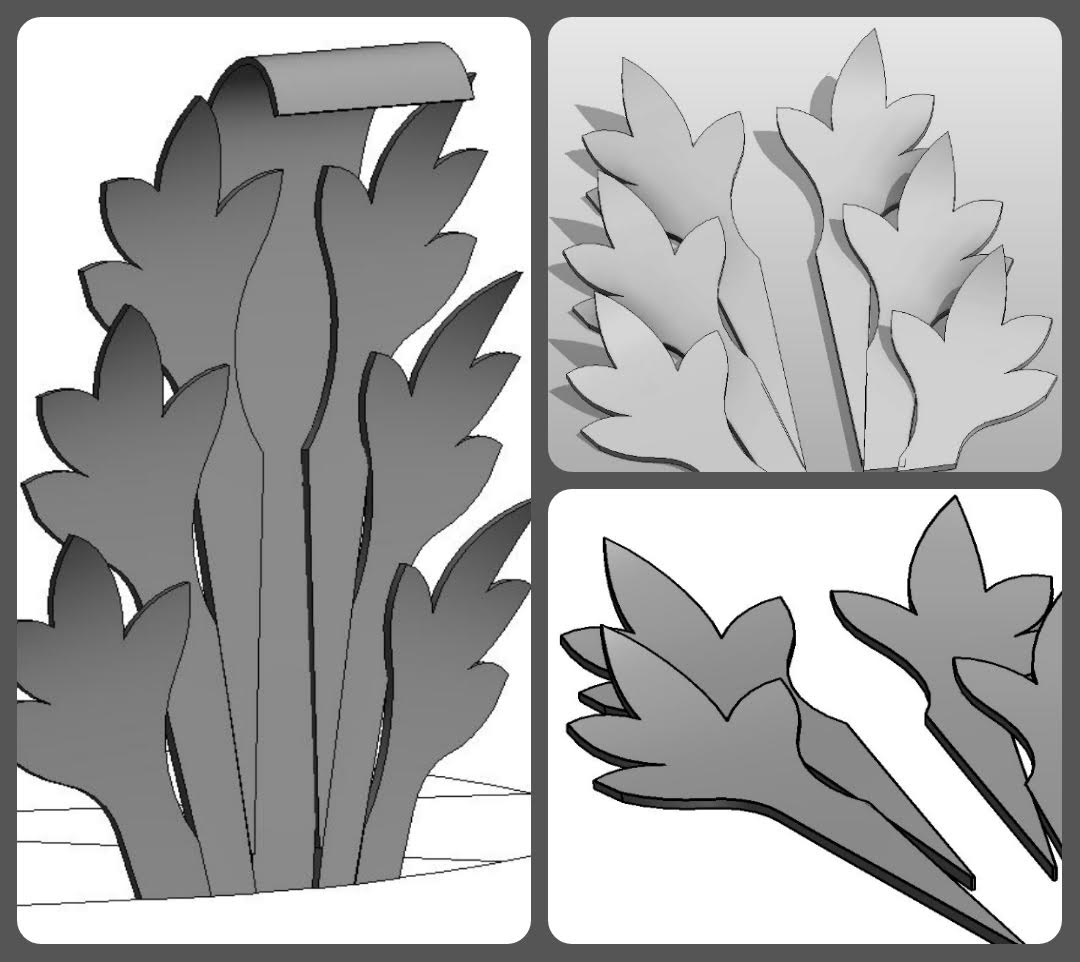
So back to Revit. I just jumped in, without thinking about size or orientation. In retrospect, I think this was important. I needed to be casual and explorative. It’s a swept blend cut by a void extrusion. That’s a very powerful strategy for stylised organic forms.


Both path and profile use splines. I wouldn’t want to use splines very often in Revit, but when you do need them, they are super cool. Before long I have 3 versions of the nested side leaf and a directly modelled centre. Rotating the side leaves up into the vertical position was a bit messy, but definitely this approach has potential.


So now I have a family I can bring into the project environment and arrange into a circle. Why do this in a project? I was just impatient to see shadows, and sadly that’s not available in family editor.


Duplicate the leaf and give it a longer stalk. Add an in-place revolve. Well , well!  Actually I lied about the profile. I started with a simple rectangle. But now is a good time to substitute a spline, top and bottom. Also make the leaves a bit thicker and curl the hood over more at the top.


I’m very proud of these leaflets. Quite easy to vary the form, tweak the way they curl around and overlap each other. You are bound to get some collisions at first but it’s so much fun to resolve them: to play with the proportions, the balance of light and shade. Shadows are so critical here.


And my trusty Enscape3d. Thank you once again guys, for supporting me. It’s a brilliant tool and plays very nicely with PIXLR, softening the images further and assembling them into collages. All the compilation and text was done on my phone again. The new routine for my Sunday morning lie-in.


The final tweak was to modify those waving hands slightly, making the fingers longer in proportion to the palms. It’s subtle, but effective. I feel like Revit has become my BIM chisel. I am a sculptor now, shaping stone and clay with my hands and my eye. The tools fade into the background as I work, but still they express themselves in the final work. This object has the feel of moist clay, of cold hard stone, of crisp and clunky Revit. I love it.


My final image has the feel of SketchBook Pro and PIXLR and the Samsung Note. It speaks to my determination to look more closely at an Acanthus leaf and to re-imagine it as Revit geometry.


Sunday, April 7, 2019

EGG & SPOON RACE


Apparently the ubiquitous “egg & dart” motif was inspired by the Greek fighting formation or “phalanx”. That’s one theory anyway, implying that those ‘eggs’ are really ‘shields’. Certainly there are Greek vases that use rows of soldiers as rhythmic decorative elements. Actually this reminds me of the Guilloche also.


I do think the connection between vase painting and architectural ornament is worth pursuing. But we have a race to run, so let’s move on.


Like many other elements in classical design, what appears to be a simple formulaic device turns out to be capable of much variety. So I started out by reviewing the versions in my archive.  The differences may be quite subtle, but when you look carefully, almost every example takes a slightly different approach.


During my third pumpkin adventure I veered off into the animal kingdom, feeling that I had already “done vegetables “.  Along the way I developed a family that I called “the universal egg “


https://grevity.blogspot.com/2013/10/egg-on-my-face.html


The core feature is a revolve, using two quarter ellipses that share a common radius. Imagine a globe whose equator is set by this shared radius. The northern hemisphere then has its own radius so it can be made rather flat, or more pointed. Similar rules apply  to the southern hemisphere.  Now you could set these three radii one by one, but I prefer to set Slenderness,” “Eccentricity” & “Width”. In other words, you have two parameters to define the shape of the egg, and a third to scale that shape up and down.


The egg is hollow (although it doesn’t need to be for the current purpose) This is achieved by having a smaller ‘void egg’, inside the solid one, and adding a parameter for ‘Thickness’ of the shell. We also have an ‘Undercut’ parameter to shave a slice off the bottom and give it a flat base.


The result is a family that can assume a wide variety of shapes and proportions, each of which can then be scaled to whatever size you like.  If the slenderness and Eccentricity are both set to 1, you will have a sphere.  Give it an undercut of 0.5 and you have a hemisphere.  Low slenderness values will give you a relatively flat disk.  Slenderness of 2 will be something like a rugby ball.


The eggs sit in a nest, hollowed out from an ovolo moulding (ie a sweep).  The nest has sloping sides, so that means a void blend. A second blend cuts away the space between two nests. In this case it leaves a solid sliver in the middle of the gap. (the dart)


In other cases, a separate component is used to place arrow heads in the gaps. So by duplicating and adapting my first attempt, I created two more versions of the egg and dart pattern.   Eventually I will nest these as arrays into line-based families, or as balusters in “railings,” using the “double-nested planting hack” to scale the geometry to suit project needs.


But right now I want to tackle another theme commonly used in classical ornament.

Some of these examples look similar to the egg and dart, but closer inspection reveals that they are all based on plant leaves. This time the range of variations is much greater.


My first example is based on wood carving technique. Almost 50 years ago a friend of mine demonstrated how this is done with a few deft strokes of a gouge, cutting away a series of crescent shaped chips. Very impressive.


As the variations mount up, you can see the advantage of using a nested dart component which can easily be adapted to new situations, gradually building up a library of mix and match modular items.


The possibilities are almost endless, as a second set of images from my archive illustrate. Some are simple and highly stylised. Others present a more elaborate, organic impression.  There is a fascinating tension between abstraction and a more faithful representation of reality: a tension that eventually gave birth to modern art.


I’m not going to explain all my modelling efforts in detail. If you are interested in this kind of thing, then half the fascination lies in developing your own strategies. I will just present one more that uses a ‘sweep and cookie cutter’ approach. There are two sweeps, one with an offset profile for the recessed surface effect.


And here is a nice YouTube link I found on carving egg & dart mouldings in wood.


This is the first blog post where I have assembled the images on my phone. I normally spend half of my weekend working in Revit and taking snapshots of my progress along the way. To weave these into a story involves grouping two or three images together and annotating them. I like my readers to be able to get the main gist of my message visually.  The narrative is an optional bonus.


I’ve been using Pixlr to process digital sketches for a while, but had been ignoring the collage function, which turns out to have a really neat touch interface. So now I can take a break from mouse & keyboard to create most of my text and images on the phone.  Friday morning lie-ins suddenly became productive as well as a way of relaxing after a busy week in my day job.


That’s a shot from the One Drive folder for this post. Of course, it’s accessible from all my devices.  The cloud is great for enabling fluid and intuitive work flows that link workstation grade machines to touch-screen phones and tablets.  Seems like the human touch is coming back into my work in all kinds of ways.


I’m going to finish with a screen grab of Pixlr adding text to a snapshot of Pixlr assembling a collage. Worlds within worlds, very “Alice” (and Humpty Dumpty)


Tuesday, August 21, 2018

SCORCHED EARTH - TAKE 1

The first thing I did when I got to St Louis for #BILTNA was to take a stroll down town to see the Wainwright Building. In the flesh, the balance between plain surfaces and luxuriant terracotta reliefs is quite impressive.


I will have more to say about this building in a future post. For now the focus is on terracotta as a building material, and how best to represent these kinds of elements in Revit. It's an LOD issue and I don't think we have a truly definitive answer at this point in time.

But Paul Aubin posted an interesting contribution to the debate at the end of the conference.


https://recap360.autodesk.com/project/0f4c83feb3894f64b2a5ad3b646ee15c

His session had been about Reality Capture, a topic which embraces a number of techniques for digitising 3 dimensional objects. He used photogrammetry in this case and displayed the results in the Recap cloud. I responded to his tweet with a suggestion to process the mesh in 3d Max, hiding edges and feeding the results into a line-based family...

Which he did in the blink of an eye, and shared the family so I could also play around with it.


This technique evokes the texture of the original terracotta cladding material very successfully when presented in realistic views. It's also OK in shaded views, and even hidden line with shadows turned on. But without shadows the decorative motif doesn't pick up at all in traditional building elevations (line drawings)  You would have to add detail lines to the family and manager their visibility carfully.


I decided to make a native Revit version for comparison. The result is very crisp and impressive in hidden line elevations, but doesn't really evoke the particular texture of well crafted terracotta.  I'm not advocating either approach as universally superior.  You need to think about what you are trying to achieve: who is using the model. and for what purposes?


In my mind, this is an important debate, very relevant to my ongoing attempts to model classical elements in a BIM friendly way.  A similar discussion crops up when thinking about the role of Art in the modern world.

"Abstraction" and "Representation" : are they opposite poles of a spectrum? or are they just two sides of the same coin: necessarily present in any process of exploring reality and meaning?


The terracotta element that Paul captured was part of the amazing displays at the City Museum which was opened up to the BiLT delegates on Thursday Night. It's more of a cross between an art exhibit and an adventure playground than a traditional museum, but full of fascinating salvaged bits and pieces. George Elmslie was responsible for much of the terracotta that enlivened Sullivan's buildings. Examples of his work were piled up in great heaps and interspersed with his delicate pencil design sketches.

https://www.citymuseum.org/


I can't help feeling that we have lost something magical. Imagine skilled artisans using those pencil sketches to guide their muscular fingers and thumbs as they shaped wet clay into flowing foliage. With Sullivan in the background judging the balance between bold massing and expressive detail.
Last night I started to sketch over another image from the museum.  It's an interesting challenge to translate these convoluted forms into flat extrusions, and it may well be the key to creating placeholder objects within a BIM model.


Surely the wild, twisting forms were a rebellion against the ordered formalism of classicism.  There is a refusal to submit to mechanical order, a revelling in the fluid ambiguities of wet clay, a return to the primitive entanglements of celtic art.  History tells us that mechanical purity won out.  Art Nouveau and Expressionism ran out of steam in a way that abstraction and minimalism never have.  But still there is an emptiness in the mechanical solution that so often leads us back to the trap of nostalgia.


Maybe there was something to be said to the measured tones of a classical language after all.  I can't help feeling that the charm of the Wainwright Building lies in the fact that, although it flirts with wild, decorative excess while embracing new, disruptive technologies that presaged the skyscraper age; it actually lies within the classical tradition.  Essentially it is a highly abstracted Corinthian column, complete with plinth, fluted shaft, and luxuriant capital.


The closing keynote at BiLT featured Sabin Howard talking about maintaining the human touch while using cutting edge technology to support the production of monumental sculpture. It's a challenge that resonates with me and echoes through the pages of this blog at regular intervals.

BIM is fantastic, but let's not forget the thousands of years of drawing by hand that preceded it.  The human touch is vital.


A lutta continua. The struggle continues.

Saturday, July 28, 2018

WORKING CAPITAL

I will be in St Louis in about 10 days time for the BiLT event.  I'm doing a lab where I will walk people through the system I have developed for creating modular classical columns. 
By coincidence, my good friend Marcello (Mr Simply Complex) shared a Corinthian column the other day, so I decided to download it and take a look.  It's a very nice demonstration of what can be done with conceptual massing, and ... it weighs in at under 12mb.  That may seem quite a lot, but "Point World" is notorious for generating huge files, so in my book he did a great job.


My own modular system is mostly based on the traditional family editor, and aims at "good enough" representation of classical form while allowing for all five classical orders, scalable, round and square columns, smooth and fluted shafts, full columns, half columns, attached corner columns ... there is a huge range of possibilities once you attempt to model real classical buildings (eg Project Soane)
I have two different styles of leaf at present, and neither of them looks much like his, so I immediately thought "let's canibalise those."  This took me on an interesting journey yesterday which I decided to share.


The strategy is to isolate a single leaf, export to SAT, bring back into Revit, & scale to the size I need to be compatible with my system. But there is a snag.  Revit 2017 changed the way that SAT imports are handled.


This has advantages and disadvantages.  I my case, mostly disadvantages: can't scale, can't find the CAD layers in "imports in families".  The solution is to bring it into 2016, save it, then open in 2018.  That way it gets treated as an old fashioned CAD object.


Looking closely at Marcello's leaf, it's made from two surfaces.  If it had been solid we could have exploded the SAT import in 2018 and applied a material parameter to the resulting "freeform" object.  But you can't really make this kind of shape as a solid, I've tried.


Each surface is created from a series of curved reference lines.  You select the lines and "Create Form"  The curve that defines the edge is shared be both surfaces so you get a seamless join, but at the tip and the base, the surface approximates a curve from the end points of the lines.  As a result there are very small gaps.  It's not a problem, you have to look very close to even see them, but it gives an interesting insight into how conceptual massing works.

I also noticed some strange artifacts on one of the flutes of the column.  No idea what causes this, and again it doesn't really matter, but it's worth knowing that Conceptual Massing is a bit quirky.


So I went through the SAT to 2016 to 2018 process and created families for "Leaf-A" and "Leaf-B"  These are the standard names I use to be able to swap out different styles of leaf while maintaining all the parameter settings that I use to control visibility for half-columns and corner-columns.


The result is a third variation of the Corinthian Capital for my collection, and it weights in at just less than 1mb.  There are some rather odd artefacts that seem to behave like quantum objects.  As you rotate the view they pop into existence, disappear, then reappear somewhere else.  Very odd, but let's press on.


There are a square versions of my other two capitals, and it's very easy to swap the leaves out now I have the standardised families.  But I do need a third leaf type: a corner version of Leaf-B.


This means going back to the source geometry.  For now I just did a very rough and ready fix by dissolving the geometry, deleting three of the reference lines, then remaking the surfaces.  Two of these pieces, placed at right angles make the corner leaf.  There are big open gaps at the corner, but from a distance it's fine.  I'll do a better job one of these days.


I went on to use the leaves with volutes from one of my Ionic capitals to create my first version of the Composite order.  Progress indeed!  I am characterising Marcello's leaves as "fleshy" and when you look around, you will see capitals that look a bit like this.  Probably more common, however is the "feathery" leaf style.  I have a simplified version of this at present, and decided to try to push this a bit further.  It's just one solid extrusion cut by a void extrusion at right angles.


I felt pretty good about the progress I had made in a few hours.  So I decided to revisit the column that Paul Aubin submitted as a contribution to Project Soane.  I know from talking to Paul that he was really trying to push Conceptual Massing to its limits.  The result is a pretty hefty file size.  I decided to target his scrolls which are more impressive than my highly abstracted versions, also slightly bigger, so that's another variation which does occur in reality.


Same process of going to SAT to 2016 to 2018.  Bring this into my existing scroll family, adjust the size and position as close as possible, then delete my earlier geometry and save.  Once again the standard naming convention preserves visibility controls when loaded into any of my Corinthian capitals.


Unfortunately the scrolls don't just drop into place seamlessly, so I had to go back to the original geometry again.  Once more it was a quick fix to get things working, but I'm pretty happy with the results.  Deleted a bit of foliage and extended the stem of a tendril downwards.  I'll get around to some square versions later (this one and the composite)  The great thing about a modular system is you can just keep on growing the collection and refining existing components as time permits.


Before I finish I must recommend Paul's book "Renaissance Revit", an absolute treasure trove of advanced family editor techniques.  Check him out on Lynda.com also.  One of the best Revit/BIM educators out there.

http://paulaubin.com/

And of course there is Marcello.  If you haven't seen him in action presenting a class, you are missing out, big time.  Check him out on Twitter also, or his blog.

http://therevitcomplex.blogspot.com/

If you are coming to St Louis, please come and say hello.  If you are interested in contributing to the creation of an open source library of classical elements … even better.