Showing posts with label Hidden Edges. Show all posts

Sunday, November 25, 2018

STATUESQUE REVITRY

A couple of posts back I put caryatids as placeholders for the four statues that stood guard over Soane's triumphal arch on the south side of Lothbury Court.  Soon afterwards I got a message from Russell Fuller Hill who did such a fantastic job of modelling the Consols Transfer Office, way back in the early days of Project Soane.  He was the original source of these caryatids, and offered to come up with a few more examples.


Sure enough, a week or so later he sent me a link to half a dozen "Greek statues" gleaned from the web.  They aren't close matches to the figures that Soane used, but at least we can have some variety.  In any case, a placeholder is not meant to be a faithful representation.  We just want to say, "here are four different statues in a classical style".  So I have taken Russell's statues and a couple that I found myself, and turned them into a little collection... to be enlarged upon as time allows.
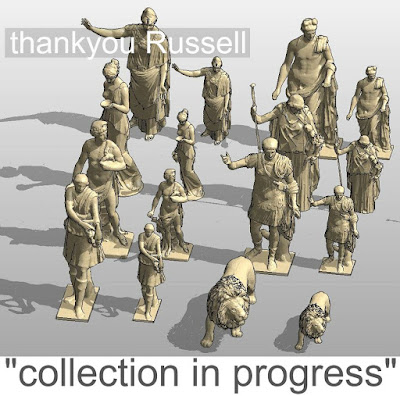


Russell's approach to mesh geometry is to give the "spiders web" a pale colour so that it fades into the background.  It's a simple solution, but I'm not happy with the orthographic, hidden line views that result.  I want to see a black outline and a little bit of detail, so that the statues a represented in the same general way as all the other geometry.  This is achieved by processing the image with 3dsMAX.  Now I'm a complete novice in Max, but I stumble my way through a hack that I picked up on the web by groping around the interface.


It involves exporting to DXF, which requires a maximum of roughly 30k faces in the model ... so you have to "optimise" (sometimes called decimate)

My first attempts to do this were abject failures.  It was simply deleting faces, leaving gaps everywhere.  Did I forget something?  Is there something different about these meshes?  Who knows?  But I fixed it by fiddling with the options.


I'm using the "ProOptimiser" function (Modifiers/Mesh Editing/ProOptimiser) and the key variable seems to be the "Merge Vertices" tick-box.  Check that and play around with the percentage figure until the faces/after number gets down to 30k.  Then export to 2004DXF.  For some reason that will remember the edge hiding that you do in the next step.


Delete everything, then re-import the DXF.  Forgive me if I am being stupid here, but this is the process that works for me.  I had problems hiding edges with a modifier in the stack.  Kept reverting to the larger number of faces.  So exporting and reimporting was a simple/crude way of getting around that.  It works.  You go to edge selection mode (a little wireframe triangle)  Select everything. Scroll down and click on "invisible".  The edges change from solid to dashed, or if you change from "Clay" mode (my favourite) to wireframe, everything disappears.  You have hidden the edges


Export to 2004DXF again and you have a CAD mesh that imports into a Revit family, looking the way I like it to look.  For some models that's all you need to do.  For the statue of Hera (I'm pretty sure that's who she is, goddess of motherhood) The simplified mesh is OK-ish but a bit crude when you zoom in.  So I included two versions in the family, with an instance visibility switch.  So when you are generating renders in Enscape3d, you get the nice smooth look.


In my collection, I've made these as Site category (maybe I want to host some statues on Topography) but inside there are double-nested planting families, so the whole thing scales to whatever you type into the Height parameter.  But I'll leave all that to another post.
 

Friday, July 21, 2017

KAK HANDED

Sadly this is already more that a week old.  Read on.

It's been a bit of a disastrous few days for me.  Maybe that's putting a melodramatic spin on it, but firstly I am recovering from a very sore shoulder which seems to be a result of posture and mouse use.  I actually spent the last day of the week trying to use my left hand.  Interesting, but very clumsy.
It makes me realise how much of my time is spent in dialogue with a computer screen.  It's been extremely wierd spending a three day weekend almost completely ignoring my laptop. Which brings me to the next catastrophe.  The wonderful new laptop I received from HP as a reward for my work on Project Soane has suddenly stopped working.  Fortunately I have my old machine and just about everything is backed up via OneDrive, but it still feels like a mortal blow.


One of the things I did with my left hand, was to make a task chair family.  I came across this thing called the "Trinetic" which offered a download of drawings and images.  I thought it looked quite sweet, and decided to remind myself how to convert a 3d mesh into a useable family via 3dmax (and Autocad)  I had forgotten, but was able to follow my own post from early 2016.  Basically it's all about hiding the edges of the polygons.     be-gone-sharp-edges


There will be the usual complaints about nested CAD, but I am over this now.  You can't model something like this convincingly with Revit native geometry.  It's not the kind of shape that those tools were designed to make.  Here is a nice smooth version, all ready made, so let's use it.  Solids are great for things that need to be sectioned.  That doesn't apply to furniture. Mesh is the way everyone models this kind of stuff for visualisation, movies, etc.  The minute you try to get half way to modeling these double curved shapes with native tools there's going to be lots of gymnastics cutting with voids and the file size will shoot up.  Really, I love some of the stuff that has been done for people like Herman Miller, but looking through that again, there is nothing that comes close to the smooth flowing tapered curves of a chair like this. 


Add to that the whole "cross-platform" debate and I just don't see the point of turning your noses up at mesh geometry.  Revit can handle it.  We know how to hide the edges.  File sizes are very reasonable.  So if someone has already done the modelling for you as a CAD mesh, gobble it up.
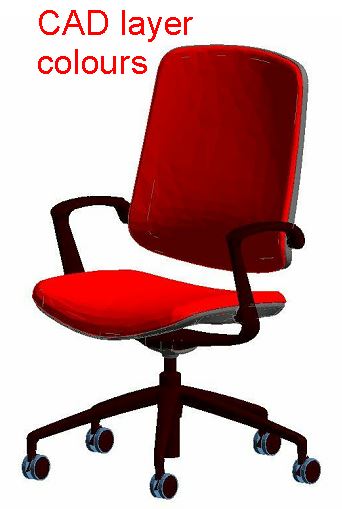
Having hidden the edges in 3dmax, exported to DXF2014 and resaved as DWG, I inserted the mesh into an RFA template.  For the most part the geometry was already sorted into layers by material.  I just had to put the wheels on to a different layer.  The layer names weren't very helpful, so I renamed them in Object Styles, which is of course where you go (within the project environment) to apply materials.


Revit has this habit of creating a bunch of materials with dumb names (Render Material 0-0-255, etc) I like to delete all these. Then I usually apply some of the default materials to the layers, just to give some definition to the family, which will also show up in the thumbnail.  I use the default materials because I believe in sharing with the global Revit community, and I don't particularly want to inflict my material naming conventions on everyone else.  It's called being polite.


Here's how my cleanup process in Object Styles played out


The next point of controversy is the use of symbolics.  I'll state my position once more.  I like to be able to produce crisp linework on sheet sets.  Maybe it's because I grew up drawing by hand, maybe it's because I think people respond better to visual communication that delights the senses.  Look at web site design, advertising, company logos, product packaging.  We have a sense of beauty and elegance, and we are subconsciously influenced in positive and negative ways.  "Old Fashioned" ideas of draughtmanship and layout do matter, whether you are trying to sell a design to a client, or communicate intentions to a construction worker.  So messy, fuzzy edges to furniture objects in my plans and elevations really bug me.  They also bug senior management who don't need to have their negative prejudices towards BIM confirmed.


In short, I may be working left handed at the moment, but I don't want my families to look like they were drawn that way.  So I have chosen to create crisp linework and masking regions in the 3 orthographic planes.  Revit doesn't make it easy for me to differentiate between front and back elevations, but usually front will do fine.

Here I am going to agree with the CAD haters.  There are 2D CAD files in the download, and it would save a bit of time to use these, but I want to have masking regions anyway, and I usually find that manufacturer drawings show too much fine detail for architectural purposes.  I'm not going to be using these at a scale of 1:5.  I want them to look right at 1:20 & 1:50. So I am redrawing and simplifying as I go.  I have also introduced a certain amount of "coarse-medium-fine" differentiation.  It's quite subtle, but might as well do it while I can.


But what about the 3d geometry? Do we need 3 versions? I suggest not.  I hate the all-purpose boxes that are so commonly used.  What's the point if you can't tell whether it's a chair or a WC?  But it may be worthwhile using 3 simple extrusions to represent a generic task chair.  Have that for coarse 3d views and the CAD import for medium and fine. Use symbolics in plan/section/elevation.


Finally I tried a quick render ... could this be another downside of meshes?  Seems like the seat is distorting render bitmaps in rather strange ways.  The back is fine, so maybe it's not meshes per se that are the problem.  Might be worth exploring that a bit more some time.  In any case it's only really an issue with large scale patterns like the striped fabric.
Anybody else want to help make families like this from available 3d CAD?  Fancy a bit of crowd sourcing?  Or maybe we could make some "collections" up ... like this one I assembled from an Italian furniture maker that I stumbled across.  Seems to me that even half a dozen experienced Revit users willing to cooperate on something like this could significantly improve the range of content available online.


link to my version of the Trinetic chair

HERE

(sharing of this link should now be fixed)

By the way it's about 900kb which is much smaller than it would be if you tried to do this with Revit native geometry. even if you accepted lots of sharp edges where this is nice and smooth and rounded off.

Oh, and while we're here, Kak-Handed, or Cack-handed as some would have it, means left handed in the part of the world where I grew up, and my association comes to mean "incompetent"

On that note, here's a recent quote from a government minister in my home country of Zimbabwe, and I can assure you it was said in all seriousness.


Saturday, April 2, 2016

EDGE FREE SHARING

OK so I've been updating my Fritz Hansen furniture collection.  First of all they are great designs, secondly there are really good downloads available from their website, both 3d and 2d, and finally the stuff I did a couple of years ago has been a very popular download.

Last time I showed the Oxford chair by Arne Jacobsen.  Their are multiple versions of this: two styles of base, 3 heights of back, with and without arms = 12 permutations.  So I separated out the components, made them into nested families and used visibility switches to create the types.  Actually I made 6 types and used an instance parameter for arms/no arms.  One strange thing.  There were some leftover edges despite the processing in 3d max.


I decided to push the CAD import bak into Max for further edge hiding.  Actually this is the only thing I've ever learnt to do with Max, so don't be intimidated. If I can learn do it, so can you.  With a bit of trial and error I was able to select the remaining edges and render them invisible also.  Practice makes perfect.

You can see this clearly in the next image.  I started with the low back, then progressed to the medium and high back versions.  See how much cleaner they are.


Eventually I did go back and clean up the low-back chair.  A side view of this isolated component illustrates the subtle irregularities of the mesh geometry in the downloads.  For some purposes this will be totally unnecessary, but if you need a high resolution render that captures the qualities of natural leather ...


Next I tackled the Alphabet range, a modular set of roughly rectangular sofa elements that can be assembled in a variety of ways.  Here the value of the irregular mesh in capturing the soft and floppy leather effect is much more obvious.


And now I'm totally hooked, so I tackled a couple of designs by Poul Kjaerholm: the PK31 armchair and PK24 lounger.  I don't know about you, but I haven't seen shaded views of Revit furniture families that look as convincingly natural as this before, and it's something I've been working on for several years now.


The collection is growing steadily as you can see: the egg, swan, space, Rin, Favn ... all looking so clean and comfortable.  And by the way, most of these families are coming in at 600 to 800kb.  Even the Oxford, with 12 different permutations nested into one family weighs in around 1300.


I'm going to share this, but please remember that it's a work in progress.  Some of the families have 2d symbolics in plan and elevation.  Others haven't yet progressed that far. It may be worthwhile setting up a switch to turn off the 2d graphics in case you prefer the shaded look.  I wish there was a way to do this selectively on a "per view" basis, but I can't think of one ... except for the coarse/medium/fine method.


Also, maybe there should be a coarse version of the geometry, much simplified.  Right now I have everything switched off in 3d views at coarse scale.  For example these are the visibility settings for the Alphabet range.  I have masking regions and detail lines in plan views only.  Maybe I will add symbolics to elevations later, certainly you get crisper lines that way.


So that's all for now.  You can download the work-in-progress collection file from here.


FRITZ HANSEN COLLECTION

ALTERNATIVE LINK


Thursday, March 31, 2016

BE GONE SHARP EDGES

In the previous post I made an appeal for anyone who knew how to hide polygon edges to shout up.  Many thanks to Fred and Arthur for the very rapid response.  Seems I should have done a web search :)  Anyway, there is a nice video here      LINK        and a written description here    LINK.

I'm a complete novice when it comes to 3d Max, but I managed to work this one out and created a couple of plumbing families from some Bagno CAD files I had downloaded.  I was quite pleased with this and talked to two of our visualisers for a couple of extra tips on the interface before tackling some Fritz Hansen furniture.


I posted about this long back, but at that stage I was stuck with the mesh edges.  LINK.  So let me take you through the process with a conference chair range called Oxford.
Drag the CAD file in (import) and place it.  Set the Visual Style to Clay (my preference, you can see the geometry clearly).  Click on the little modify symbol (top right, like a rainbow in a box) It should say "Editable Mesh" in the box below.  Then click on the open red triangle in the next box down (Edge)  Now you are selecting edges so put a window around everything.


Next scroll down to the bottom of this panel and click on "Invisible" Nothing seems to happen, but if you now change to wireframe the edges will ghost out.  Click on empty space to deselect and they disappear altogether, so go back to "clay" so you can see the faces and select objects.


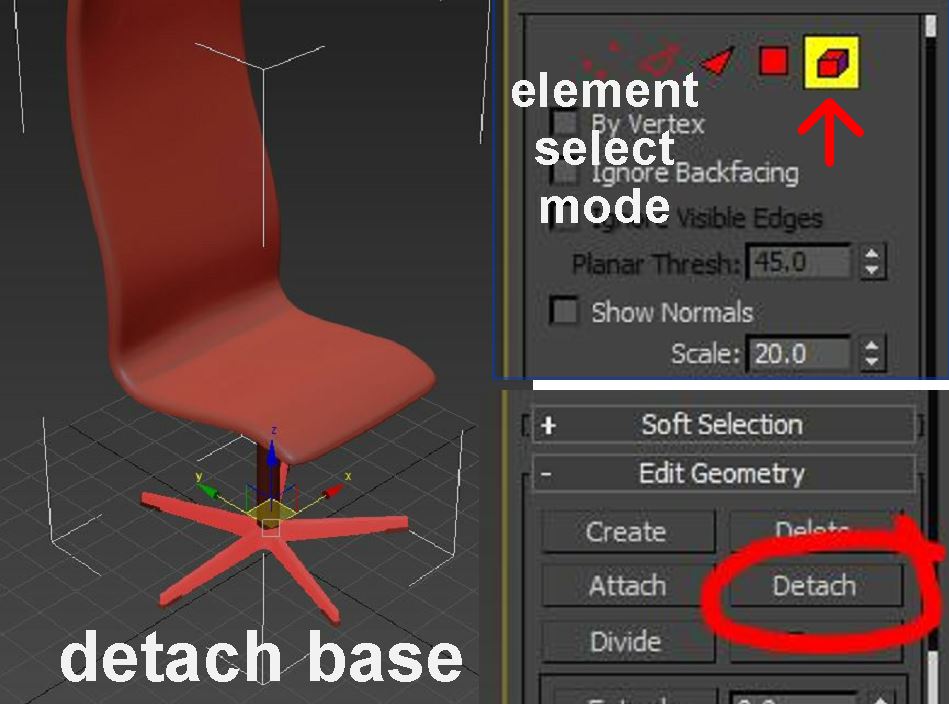
Scroll the panel back up, and click on the box (Element) at the far right under "Selection".  Now you can select sub-elements.  In this case I have selected the five-legged base. Then click on "Detach" to make this a separate object. You don't have to give it a name because we aren't saving the 3d Max file, just exporting to CAD. Just accept the default naming (Object 001 etc) Continue like that to break up the chair into separate pieces.


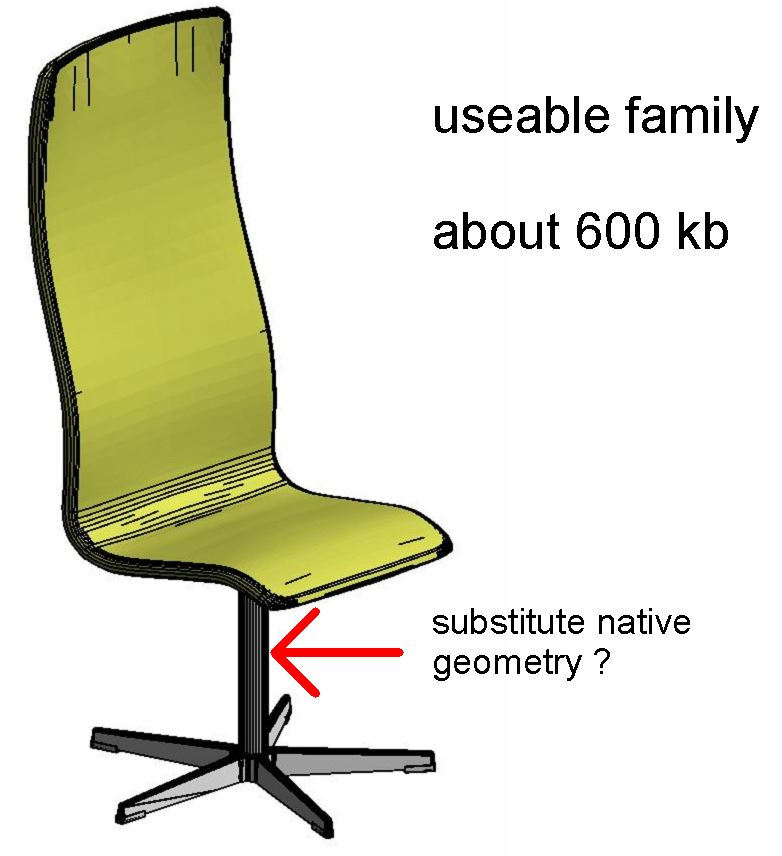
This will allow us to place the base and the seat itself on separate layers.  Also we can delete the cylinder if we want, and replace it with a native Revit extrusion.  That might be better than a facetted mesh.

Finally we will export as a DXF 2004.  Don't know why that is important but apparently it is.


Opening this up in AutoCAD, everything is on layer 0. I'm going to make a new layer called "_Fabric" and place the seat on that.  Then I put everything else on a layer called "_Metal"  Save as DWG. I don't think the version matters this time.  (by the way, I checked that everything was set to "bylayer")


Now let's try bringing this into Revit.  Start a new family from the Furniture template and import the DWG. In this case it seems the base units are Centimetres.  Sounds right for continental Europe. I had to nudge it into position over the origin.


Looking at object styles both line colour and Material are coming from the layer colours I set up in Autocad.  I'm going to delete the two surplus layers (0 and ASHADE) then change the Line colours to black.  Also I substituted default materials for the automatically generated ones (Render Material 0-0-255 etc) and deleted all these in the materials browser. Don't want to transfer a lot of junk into my projects.


Now this is a fairly useable family as it is, but ultimately I will probably separate out the various elements.  The seat comes in different heights, and there are also different styles of base.  (one with wheels)  So it makes sense to follow a modular approach and mix and match nested components.  Also I'm going to substitute native geometry where I can, for a cleaner look ... basically the cylinders I think.  I think it will also be valuable to use 2d drafting in plans and elevations.  Better for performance, but also a cleaner graphic look for orthographic views.


This particular family is not the most dramatic demonstration of the technique perhaps.  You could almost do this in native geometry entirely.  You wouldn't get the subtle double curvature and rounding of the edges but it wouldn't be too bad.  But earlier on I did the Rin chair which is a complete non-starter with Revit's modelling tools.  This turned out very nicely, and looks quite good in plan and elevation even without 2d drafting elements.


Looking at Revit Forum, one comment caught my attention: "... use only if absolutely necessary. Make Native Revit geometry if possible."   Now I do agree with this, but words like "necessary" and "possible" are open to interpretation, and I am aware that some members of the "expert elite" are more dogmatic on this issue than I am.  I think that an acceptable version of the Oxford chair could probably be made as Native Geometry.  It might look a little stiff in rendered views compared to the subtle curvature of the mesh version, especially around the edges, but for most purposes it would be fine.  The Rin chair conversely is a clear case where adapting the downloaded mesh version is really a no-brainer.  In between there are many shades of grey.  Ultimately it's a judgement call.

I will be doing more of this type of work, and probably sharing the families, but for now, I'll finish with a shot of 3 of my new "edge-free" families nestled among older messy-mesh versions from my previous Fritz Hansen post.   Furniture Fritz

Needless to say, I'm quite excited by the possibilities.