Showing posts with label Doors. Show all posts

Sunday, January 24, 2021

AND MY BIRD CAN SING


Let’s try to cobble these LinkedIn posts into a blog.

I’m enjoying a new process of several short posts over a weekend, as I work.  But it would be nice to keep a more permanent record going on the blog here.  It started on Thursday evening with the decision to take a crack at an Art Nouveau door by Victor Horta.

The interesting aspect of this is how to maintain some parametric resizing ability with these irregular shapes. Weekend preview.

I love the Art Nouveau elements! One of my favorite periods for both Art and Architecture! Yes I fell for Art Nouveau as a teenager in the 1960s. Part of the "Art is Rebellion" metaphor I guess. 🙄


Tricks of the trade in a BIM context. To stop these delicate quirks /flourishes in the corner of door frame and opening from distorting as you flex the door size... It's possible to create reference planes while in "sketch mode" and to tie them to the edges with locked dimensions.


This part is quite tricky. I can keep the arc tangential to the bottom edge by locking it to the centre line of the door panel. But as I vary the door width the spline twists. Really I would like it to always meet the side edge at right angles... more or less. I love these challenges and what I learn along the way. About #doors, architectural history, #joinery #geometry ... #revit

Life is good people
😎

Thanks for posting..... it's always fascinating to see your experimentation and great that you share your knowledge

My Pleasure. Wouldn't be half as much fun without the sharing bit 😁

you're using a spline. Have you thought instead of spline to try with two arches that you can control?

I'm using splines for their automatic scaling when you lock the two ends. Works very well for the curvy transom, not quite so well for the quirk, but it will do for now. Thanks for the suggestion.


Hotel Max Hallet, 1902. Just a quick #bimpencil sketch this afternoon. Building the house around the door 🙄 May get a bit further tomorrow. Thanks to those who posted comments and suggestions, all useful to be sure.


It started with a door, but these #bimpencil adventures always lead to unexpected pleasures. Three glass pods balancing on steel prosthetics like pirates' legs lured me into some careful setting out this morning, and to add an "arch flattening" parameter to my half-round opening family so that it can double up as elliptical. More steel peg-legs next to support those arches. Fascinating stuff to be sure, to be sure, (Jim lad.)

... and to my shame I had never heard of Victor Horta; as ever, thanks for the invaluable back-handed (unintentional !) education I am receiving from you (all) 🥂

Interesting modelling. Would be nice to see the original windows to compare

Hotel Hallet by Victor Horta. Lots of photos online for this and his other houses in Brussels.

good luck with the curved top of the curved windows. You are not modelling with curtain walling system of Revit, right?

I have been using a curtain wall to rough this out and towards the end of the day made a loadable family for the top portion. Will share more tomorrow. It would be possible to spend some weeks modelling this house so I am being quite selective about how far I take any one family. The aim is to understand the rationale behind the design


They look a bit wierd from the outside, but nice curved window seats overlooking the garden. The top lit stair hall is typical Horta.

Excellent. i like the basement being on garden gf as well. but keep in mind function unless the 3 windows are each used desperately( piano, office desk and seating in the middle) y not make the middle one larger (maybe oval maybe just a striated really big bay window).

Thanks for your comments. This is a study of an existing historic building from 1902 in Brussels by the originator of the Art Nouveau style, Baron Victor Horta.

Love the window seat feature !

Certainly a labour of love and a search for deeper understanding of the way our species has built containers to inhabit in different times and places. I have a passion for history, for learning by doing, for geometry too, I guess. I have a deep interest in the building trades stretching back some 50 years and have been messing with computers for more than 35. Sometimes call myself a BIM addict 🙄


Just a rough BIM sketch, but a fantastic learning experience for me. Try to imagine being a Brussels lawyer in 1902 and commissioning this chic, state-of-the-art townhouse from the famous Victor Horta, pioneer of Art Nouveau. 50 years later I was just one year old. 70 years after that will take us to next year. Will I take this further? Does anyone else want to take a couple of door/window families and run with them? Stay tuned folks


There was an interesting exchange with Mark Maas who I already knew a little from the Notre Dame work. 

Why won’t you work with profile families?

Profile families are great Mark. Not sure how they would help in this case. Maybe your question is why don't I assemble my more regular framed door panels as a series of sweeps? Not sure I have a good answer to that. Perhaps I will give it a serious shot one of these days and assess the pros and cons. I have always used loaded profiles for the architraves (trim) and often for the door frames, but not so much for the construction of door panels.

the purple lines good be you’re profile family. I think profile families are more stable and have more possibilities to flex dimensions. And you can easily exchange them within the host family.

On reflection I think Mark’s proposal of using a loaded profile for the glazing cutout in the door has a lot going for it.  Definitely want to try this out in a future study.  One further bonus is that you can use the same profile for the glass as for the hole it fits into.


Saturday, September 19, 2020

MODULAR DOORS


When I talk about modular Revit families, I usually mean a system of nested components with consistent sets of parameters that can be “mixed and matched” to create a large variety of combinations.  For several years now, I have been using this approach for doors. 

The great thing about this, is that the system evolves over time.  This weekend I decided to expand its ability to handle doorways with arched heads.  Half-round heads are easy because of the way semi-circles “snap into place” in Revit.  Shallow curves are a bit harder.  You will need a couple of extra parameters and a formula or two.

This is the way that I do it.


Now I need to apply this to my nested modular system for doors.  In the host family, we have a wall and an Opening Cut.  In this case I added some loose geometry for the plaster surrounds.  It’s not totally loose, the extrusions are hosted on reference planes, and the sweeps are hosted on the extrusions, but it’s not a nested family.  I might do that later for additional stability.

First level of nesting gives two families called “Frame” & “Doorset”  These are linked back to width & height parameters in the host family.  Nested inside the Doorset are “Panel” & “Swing” families, also with linked parameter sets.  Because these are double doors there are two of each.  The Swing family is purely symbolic, so it’s only visible in plan views, and will not be affected by the shape of the door head.


The hard work here was setting up the formulas in the nested components (Frame, Doorset & Panel) and linking together the “Rise” parameters so they can be controlled from the top level.

There is an extra complication because the frame is bigger than the Doorset, based on the thickness of the jambs.  Fortunately all the curves are concentric, so it’s not too difficult to make the necessary adjustments and get everything to flex in harmony.

The good news is that, now I have set it all up, when I want a different door panel I can just dig down and edit that component.  Similarly I can vary the frame.  It will be fairly simple to adapt this into rectangular doors with an arched fanlight, for example.  Also quite easy to convert it into a single door.

For now, though I just have the door I need for this project, and if I need to adjust the width or the height … no problem.


Sunday, August 28, 2016

ARABIC DOORS

This is a post that's been sitting around waiting to happen for 18 months now.  I just can't find the time to devote to this blog that I would like to, even though it consumes most of my weekends.  The folder is called "arabic doors" and dates back to January 2015, but the topic is rather broader than that.  Actually there is a post from that date and this is basically a carry-over: material that I wasn't able to include in that post.

Bridging the Gulf

Around that time I did a lot of family development work for a project that is now on site, one that attempts to conjure up the atmosphere of an "old quarter" in one of the Gulf towns.  Arabic doors are a well-known motif from that style of architecture: richly carved planks of hardwood nailed to cross-pieces to form two narrow leaves, opening inwards.


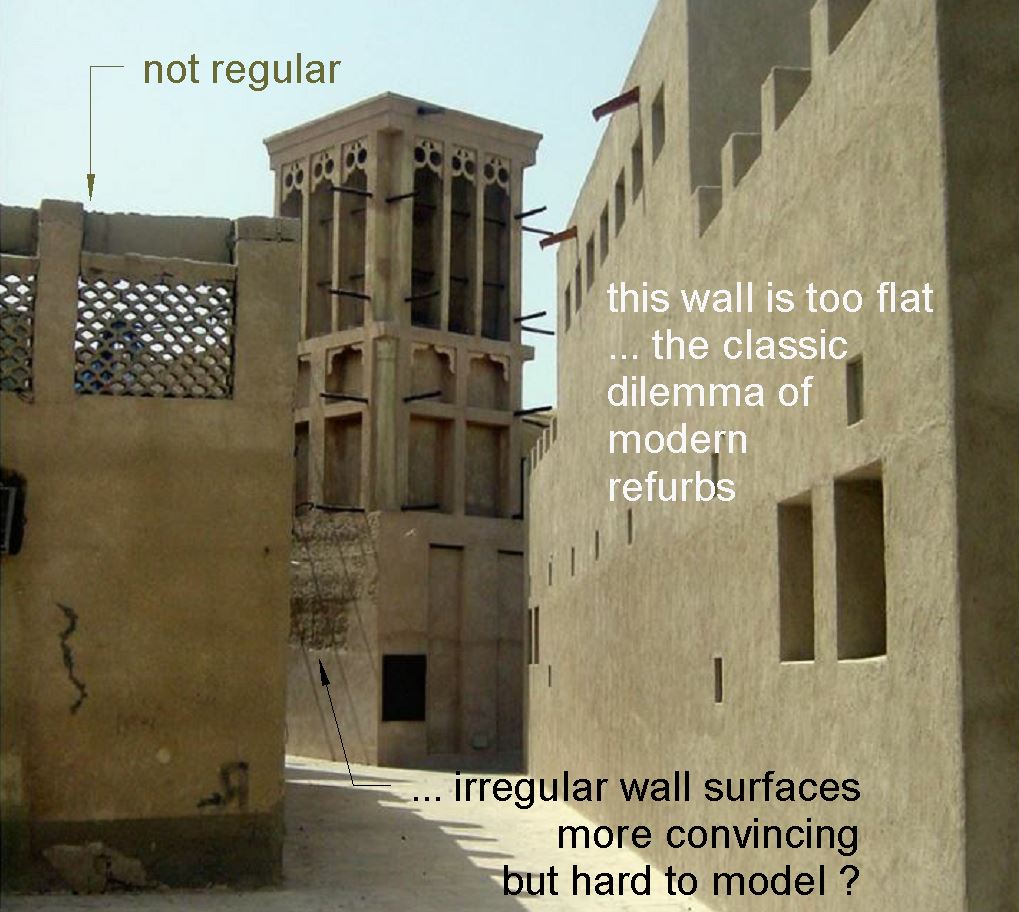
These doors typically lead into long narrow rooms, roofed over with palm trunks beams.  The walls are lined with a rhythm of niches and shuttered windows.  You can get an idea of the construction techniques from the images below, which I took about 10 years ago in an abandoned settlement in the north of the country.  If you look carefully you can see the remnants of round pegs sticking out of the walls that would have carried oil lamps.  You can also see cement plaster, smeared over the original material, with its tendency to peel off in sheets (new wine in old bottles?)


Gypsum and lime would have been the traditional binders of course and there is a strong tradition of decorative plaster work.  You can see it in the reconstructed fort below, rather too precisely geometric I think, a common temptation in renovation work.


There is of course a strand weaving through the architecture that originates in a much more delicate and temporary style of building.  People lived in tents, some permanently, others seasonally.  These are portable dwellings of course, that can be rolled up and packed onto your beasts of burden.


But there are other ways of building lightweight structures that encourage air movement, ways that are better adapted to a dense urban setting.  This is the Areesh or Barasti style of work based on palm fronds and reeds, ranging from matting to open mesh walls.


It can be used for small houses, or shopkeeper's kiosks in the bazaar, and it can also be adapted as a style for interior decoration, lining the niched walls that we saw earlier with a softer and more intimate kind of finishing layer. 


There are other well-known typical elements: the wind towers, wooden gargoyles, perforated screens and so on.  But the challenge for the modern architect, (and for the would-be BIM modeller) is how to capture the charming informality and irregularities of a traditional vernacular style like this one.


That was the topic for one of my presentations at RTC Washington, and you can take a look at that on my Docs.com site if you wish.  I have taken the position that this blog is for roughing out ideas and recording my working processes, whereas the more polished end products can be collected together on Docs.com.  Also, the blog is targeted more at BIM addicts and Revit fanatics, whereas Docs.com can be a bit more amenable to the general reader who really has no interest in picking up "tips and tricks" (how I hate that expression with its implications of shallowness and deception)

Highly Irregular (Powerpoint)

Going Organic with Revit (Handout)

So here are one or two images from Revit to justify this being a blog post.  The first is a lozenge that fits within a door panel.  It's a nested component so X and Y are going to be linked to parameters in the door family.  The extrusion sketch comprises four lines with ends locked to reference planes.  I'm assuming you all know how to "tab-lock" a line end to the intersection of two reference planes (separately locking to the two planes really, but the aim is to have the line end track the intersection as this moves in response to user input.


Returning to the challenge that I glossed over earlier, in practice this decorative element would be slightly irregular and probably embellished with a decorative flourish or two.  But in BIM we have to consider Mr LOD.  What does he have to say about the appropriate level of complexity for this situation?  In this case I was interested in capturing the idea of a particular style of door as simply and economically as possible.  There is going to be a typical detail of that door type to guide the tradesman responsible for making it in the workshop.  And there will be a whole process of shop drawings and approval of samples or mock-ups. 


The main model ("the BIM" as some would have it) is there to help us to coordinate our work.  We want to see how all the elements fit together and interact.  Do we have the proportions right?  Are there any technical issues?  So we want to recognise the 8 different styles of door that have been chosen for the project, but we don't want to be distracted by too much detail.  And we definitely don't want the MEP consultant's CPU to explode just because we decided to show the door carvings in exquisite detail, and she is obliged to load our model in the background in order to place her ducts.  Perhaps we will have been considerate enough to place all the doors on a separate workset, but then she might want to see the door swings in plan when placing her electric sockets and light switches.  So we should definitely consult Mr LOD at regular intervals and take strategic decisions about levels of complexity.


Irregularity is harder to convey.  It's fairly easy to skew walls by two or three degrees in plan for example, but virtually impossible to model the subtle curves and undulations that you would expect to see in the plaster work of an old building.  I have never tackled this on a real project, but in studies I have shown that you can fake it to some extent by skewing the reveals of doors and windows, which is where the irregularities show up most obviously when you stand in an old room.


It's all a question of "trompe l'oeil": fool the eye.  Our brains leap to conclusions.  They have to in order to interpret the complexity of life in real time.  So quite simple cues can get the message across, and most of the time that is enough.  We have a team of people who are sharing ideas, working together to develop a design proposal for a building.  We are all making hundreds of small decisions each day, and from time to time rather large and important strategic moves.  The idea of BIM is to provide a single, live context where we can see the consequences of all those choices evolving over time.  We want to make informed decisions in a rich context.


Our brains need enough information to assess and review.  Sensory overload is not going to help.  Look at a typical infographics dashboard.  See how simplified and abstract they have become.  Perhaps we need to set aside our obsession with reproducing "reality" and think in terms of diagrams that support decision making.


Section views are diagrams.  They help us to decide how a building will be assembled, as a sequence of trade operations.  For this project I developed a series of detail items that could be embedded in recess families that are used either stand-alone or above doors and windows.


The thick walls are created using cavity construction and the outer leaf steps back wherever a recess is needed.  That's how it works in real life, but in Revit a recess is simply a void, cutting into the outer leaf.  Sometimes it will emulate "wrapping" for the plaster layer, in plan views, but in section it will just cut away, leaving blockwork apparently exposed.  My detail items show up in section views to represent the recessed blockwork, plaster and a smal lintel above to make the transition.  None of this material will calculate and schedule of course.


This approach is fine for square headed recesses, but less so for an arched niche.  The detail item knows nothing about the sections that cut through the family so it can't adjust itself to their position.  Probably you have set it to show a section through the dead centre of the opening.  Unfortunately that will not always be where you section lies, and the result is a bit of wall poking out below the lintel.  You can solve this by doing the detailing manually for each and every view, but that kind of defeats the idea of BIM, and falls down completely when someone else decides to adjust the section position at the last minute without realising that those details are now out of whack.


Many of the wooden shopfronts on this project have external folding shutters.  This was an interesting challenge.  I didn't try to make the angle variable, but I did need a family that would adapt to different sizes.  This involved hosting a nested component on reference lines and locking the ends to reference planes.  Looking back at this now, I'm rather astounded that it all worked, but it did. Once again it provided enough contextual information for us to visualise what was going on and anticipate various kinds of problems on site.  And in the end we had a set of drawings that could be used to tender the project.


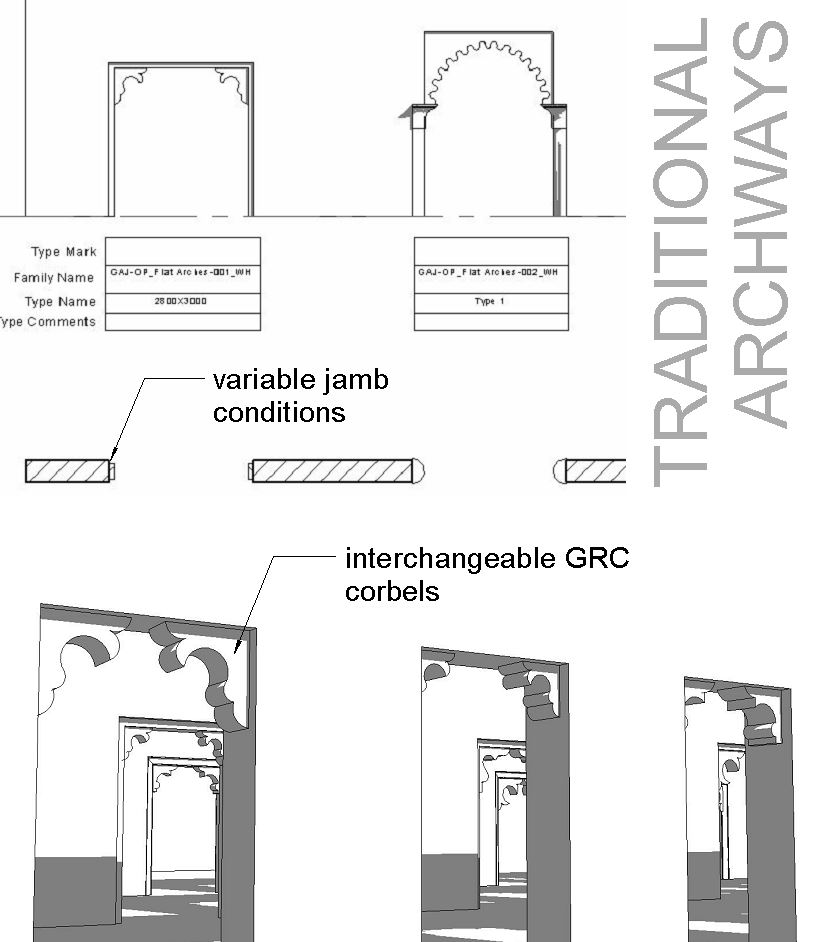
Finally here are some images of archways.  There were lots of different styles based on nested "corbels" that could be swapped out.  Once you have this set up, it's easy to add in another style of decorative corbel, and you can use the same corbels in families with different jamb details.  These arches were a very effective way of introducing "organic variety".  You can have three in a row of the same design, then turn the corner and find on that is slightly different.  You can have some buildings that are relatively plain and others that are more ornate. 


Irregularity, vernacular, challenges for BIM tools, Mr LOD, random thoughts, all for now.

Monday, August 1, 2016

THINKING ABOUT DOORS

There is a door that I made(some months ago) for the Banking Halls.  The middle, opening part is taken from photographs of doors that exist today in the Bank Museum (the reconstructed Stock Office).  The surround is based on a drawing of Soane's and a 1920s photograph of the Colonial Office.  I had made the surround rather crudely, and the whole thing was a fixed size with no built-in modularity.  So I decided to make this slightly more robust and parametric, then go on to build more doors with interchangeable components to allow for more variety and flexibility.


A fully parametric version would be quite demanding, but making parametric moulding profiles for the segmental pediment is perfectly doable. It all comes down to Height and Depth, with 3 intermediate parameters (X,Y,Z) that are all expressed as fractions of "Height".  In other words, increasing Height will scale the whole profile up, while Depth can be varied independently.  The ogee curve is a polyline, locked to the corners of a square of side "Z".


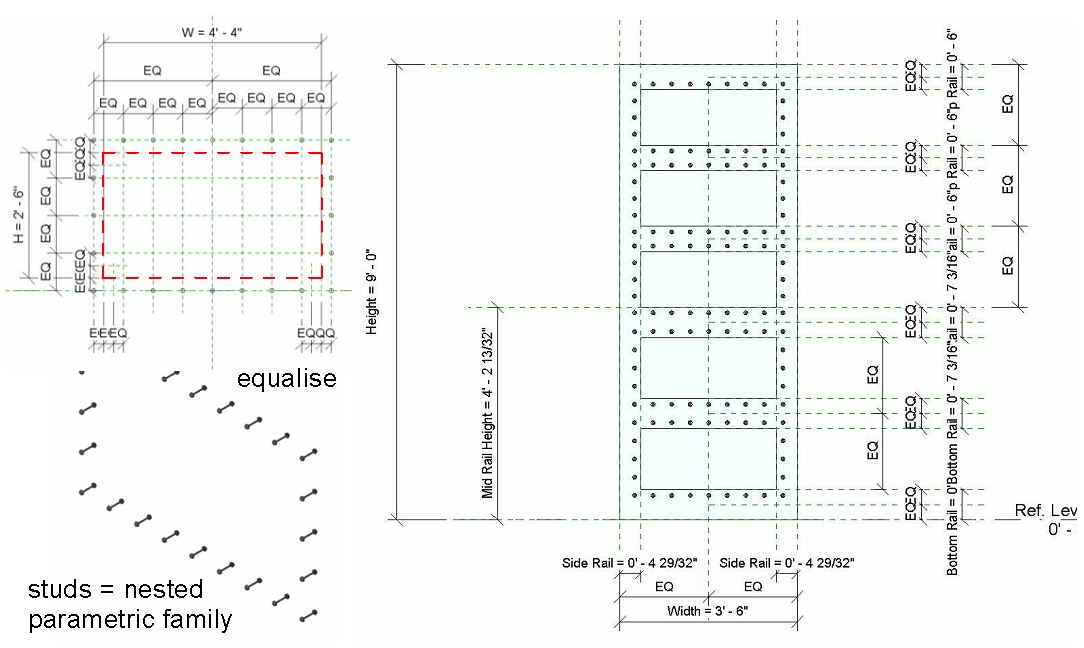
The next thing I attempted was a typical Soane studded door panel.  He used this type of door on just about all of his buildings.  I'm not sure of the original derivation. The tricky part is getting the arrays of studs to scale up and down.  I took the view that we don't need a huge variation in size.  These are doors after all.   So I kept the number of studs constant and all I need is quite a lot of equalised reference planes to respond to different sizes of panel.  Maybe another day I will do one with an array parameter so we can type in the spacing of the studs and have the number of items automatically calculated, but this time around I lacked the patience.


So I went on to do make a whole series of doors, all of approximately derived from a Soane building in some way, and most of them having parameteric door panels that are interchangeable.  Some are single. some double, and again there is interchangeability.  Behind the scenes here is some work that has been bubbling away on my stove for a little while now, a way of doing modular door families that will allow for maximum reuseability down the road whenever we model a new type of panel, surround, door swing, hardware set, whatever.  This will be the subject of one of my sessions at RTC Europe in Porto, later on this year.  It's an experiment, but it's working out quite well so far.


One thing to note, with these complex door surrounds.  When you have a piece of geometry in the family that lies completely above the cut plane, it will show up in the floor plan, unless you explicitly tell it not to.  I guess this is intentional.  You might want to show the pediment over these doors as a dashed line in plan, perhaps.  While I'm on this topic, I always found it a little odd that the "Visibility Settings" button only shows up on the ribbon if you select geometry made with the same tool, e.g. all sweeps, or all extrusions.


Another way to force something to hide in plan is to "Join Geometry" with something that DOES intersect the cut plane.  In this case, all the pediment elements could be joined up to the architrave moulding (the sweep going around 3 sides of the opening)  One drawback is that things that are joined together automatically share the same material (or material parameter).


I proceeded to change several of my generic openings into real doors and that's going to be another of those tasks to spread out over a few sessions.  Sometimes there are photographs to show if they are single or double, and whether they open in or out, but none of the floor plans offer clues, so there will be lots of semi-intelligent guesswork.  I'll conclude with a portion of my Working Plan View, which shows the model in pink and red, with a reference plan below in black.  Lots of minor discrepancies and missing details (fireplaces, pilasters, niches, columns)


I can't do much about the discrepancies now, either the hand drawn plan is inaccurate, or it results from normalising the alignments, difficult to be sure which at times.  I'm not going to start rotating individual portions of the plan by a degree here and a degree there at this stage.  That would just be asking for trouble.  Some of the crosses are rooms, some are groin vaults showing up from the cellars below.

I think I should probably revisit the parametric dome family for the next post. Had a couple of requests for that.

Sunday, January 24, 2016

LEFT-RIGHT, LEFT-RIGHT

I'm pretty sure Steve Stafford will have posted about this at some point, but I don't think it's anywhere near as well known and understood as it should be so here goes.

After more than a decade of using Revit, last week a penny finally dropped inside the rusty cog-wheels of my grey matter.  Have you ever been frustrated by dimension chains losing some of their references when you reload a door family, or swap types, or whatever? This has been bothering me for a while.  Sometimes it even happens when I duplicate a type within the same family. Sometimes dimensions jump to new positions, even rotating through 90 degrees perhaps.


I am in the process of making new standard door families for use at GAJ.  At a rough guess I would say it's my 4th or 5th attempt to tackle this crucial standardising task.  Over here, doors are usually defined by their structural opening sizes. That's the dimension you give to the contractor. It appears on the dimensioned floor plans, and in the door schedules.  The width of the door panel, and the resultant clear opening size are derived values, depending on the jamb detail and door leaf thickness.


Most door families are driven by the Width and Height parameters.  The Rough Width & Rough Height tend to be derived by way of formulas.  This has caused some confusion in our office.  So I set out to make Rough Width and Rough Height the labelled dimensions, demoting Width & Height to the status of calculated values.  I know some people like to make new shared parameters with more explicit names (Structural Opening Height, Door Panel Width etc)  But I prefer to use what's built in if I can.

In the process of re-labelling I had to think carefully about which reference planes I was using, and to test the stability of dimensioning that resulted.  It turns out that by far the most reliable approach is to use the hardwired "Right" and "Left" for the ref planes you intend to dimension (Rough Width in our case)  Even better, choose "Not a reference" for the other planes.  Then your minions are much less likely to pick the wrong plane by accident.  Any other family that's made in the same way, with the driving dimensions attached to "Right" and "Left" can be swapped out with confidence. 


It's obvious to me that this is intentional behaviour.  That's why families have these built-in "Special" reference planes.  Those are the ones that you are going to pick up for dimensioning in your document set, and they are going to be stable, because Revit recognises them when you swap out a family.  But talking to other experience people in our office, I couldn't find anyone who was aware of this.  Maybe it's in the documentation somewhere, but I don't think it's widely known.

This is a real shame because it's absolutely fundamental and anyone making loadable families that are going to be dimensioned in a construction drawing set should have a firm grasp of the implications.

You need to be clear in your mind what is the critical overall dimension for this type of object.  In our case it's the edges of the "Structural Opening".  Then you need to make sure that you use the "Right" and "Left" reference planes to define these edges in all your families.  And do think carefully about which parameters you want end users to input when defining the size of doors.  What is the standard industry practice where you are ?  Think like a contractor.  That's often the best advice when determining BIM standards and procedures.