Showing posts with label RTC. Show all posts

Thursday, October 15, 2020

WILL IT SCALE?


Blog posts from early 2013

This was an exciting period for me.  I visited New Zealand for Revit Technology Conference, to stay with my sister in Auckland and to see something of that unique country.  Alfredo Medina came up to me at the RTC social, introducing himself and sparking a lifelong friendship.  I sat in on a couple of Marcello sessions, heckling him on the difference between Doric & Tuscan, but feeling totally inspired and motivated.  His scalable Tuscan column (based on a spline) got me going.  I was aware of basic spline behaviour (two ways of stretching the end point by using the TAB key) but I had never thought of using it to scale a profile, or a revolve sketch.  This was rather early in my journey into classical architecture and long before Project Soane took a hold on my life.

I stand by my conclusion at the time.  You can do classical architecture well, and you can do it REALLY BADLY.  Take the time to study and learn.  It is a very deep well of tradition.  If you are not to put in the hard yards, just leave it alone. 

https://grevity.blogspot.com/2013/06/spline-sailing.html


The glass onion arose from a challenge that cropped up at work.  It’s a good example of using “pick 3d edge” to create complex curves using the traditional family editor.  Probably I should go back to this and see if I can make it more fully parametric.  The last part is also interesting.  Using the rectangular rig to make parametric domes … a family of onion species with different proportions.  I think I should revisit this whole area.  

St Basil’s cathedral, Moscow … anyone?


https://grevity.blogspot.com/2013/06/making-glass-onions.html


And back to the Tuscan Column theme.  This is not my current approach to capturing the fundamental variety that is available using the Classical language, but it was an important step along that road. 

I really must get back to my column collection, and get it into shape for sharing, at least with a limited audience.  The whole range of Classical elements within Revit should be an established open source project.  Paul Aubin’s book was a huge contribution of course, but I think we could do a better job of extending this, developing robust content and sharing it widely.


https://grevity.blogspot.com/2013/06/tuscan-rig.html


I think “Flat People” are still useful.  Photoreal is great … but not always.  Sometimes you want a more stylised, line-art approach to the graphic presentation of an idea.  Early concept design for example.  You might not want to mislead the client into thinking your design ideas are more fully developed than they actually are. 

This is my second post on the topic and I had a couple of people share their collections, so I created some more, as I had promised. 

“One thing that experienced users with a public presence can do is to create better content and make it freely available.”  Here, here! I’m still in favour of that.

And another quote from the end.  I’ve been saying this for a long time now.

“we should also strive to treat Revit like a pencil.  Just pick it up, let it become one with your hand, eye & brain, thinking about the vision you are trying to capture.  Let the tools become transparent.  Create.”


https://grevity.blogspot.com/2013/06/more-pancake-people.html


This is another “revisit”.  Spiky geometry that is easier to make in Sketchup than in Revit BUT tends to lose it’s ability to translate into a solid.  Mesh objects won’t support the “mass floors” feature which is so useful in Revit based early design.  I haven’t used Formit for some time, so I’m not sure if the conversion is more predictable or easier to handle using that route.  Another thing to get back to.

Maybe most people would use Dynamo and direct shape geometry these days.  Will have to talk to Daniel about that.


https://grevity.blogspot.com/2013/06/spikey-stuff.html


It seems like almost every post from this time-frame is something I want to explore further.  This is a variation of the rectangular grid.  This time a circular rig with radial spokes.  There is an exchange with Paul Aubin in the comments.  He has a very elegant method for modelling volutes in his book.  Currently my volutes are very abstracted and low-res.  Perhaps I could combine this rig with Paul’s approach to create a parametric volute generator.  Once again, maybe dynamo would do a better job.


https://grevity.blogspot.com/2013/06/spiral-rigging.html


Monday, March 30, 2015

HIGHLY IRREGULAR


That will be the title of one of my presentations in Washington this July. 

I am very proud to have been accepted once again as a speaker at RTC_NA, the North American version of the premier Revit Conference, "by users, for users".  Really looking forward to spending time with old friends and new, visiting the capital city for the second time, and hanging out with my daughter Wendy both before and after.


This diagram that looks a bit like a mouldy growth, spreading across a cracked wall, is in fact a subway map of Washington DC, subjected to various digital distortions.  This is one way to generate irregular, seemingly organic effects via the hexadecimal rigidity of the mindless machines that dominate our modern lives.  My session will approach a similar topic from a different angle, using basic family editor techniques to conjure up an impression of the casual disorder that typifies vernacular buildings.  You are most welcome to join me.

You may have noticed that my blog has been sadly neglected for several weeks now.  We have been burning the midnight hours at GAJ, a sure sign that Dubai is starting to go somewhat bonkers again: projects coming out of our ears.  Intense work experiences generate new ideas and I continue to reflect and learn as I stumble along with BIM pencil in hand.  Hopefully I can find more time for digital sharing over the coming weeks and months.


Last weekend was a chance to do this, and to start working on my presentations.  But I was side-tracked as I leapt (metaphorically) out of bed on Friday morning, by an idea for the RTC logo.  I don't want to be rude because I have great respect for the guys and gals behind this wonderful event, but IMHO the graphics are due for a makeover ... a little dated, don't you think ?


Anyway, it set me off on a little journey based on "why don't I do this in family editor ?".  I belong to that small band of fanatics who think that about almost anything.  I had in mind those Bauhaus style typefaces that are highly abstracted into parallel bands of straight lines and arcs.  Couldn't that be parametric ?


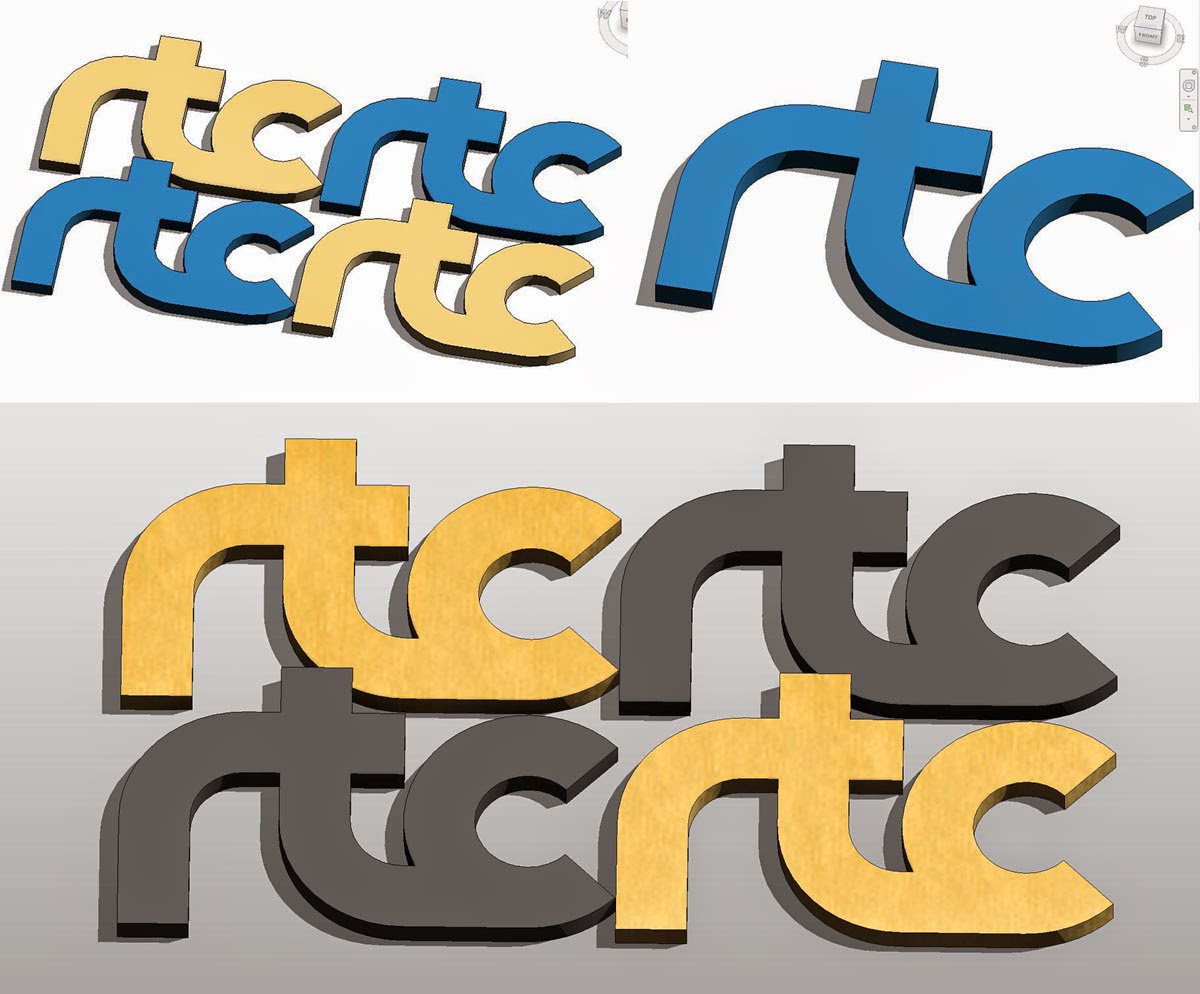
This is all sweeps.  Just 3 of them in fact.  The paths are constrained to reference planes, with a couple of reference LINES thrown in to keep the ends of the letter C to a 45 degree termination. 


I'm using a loaded profile so that the width of the letters can easily be varied in a coordinated manner.  The original motivation here is to be able to play with proportions parametrically, something that is harder to do using a graphics programme.
As a bonus I get the third dimension (which we will call thickness)  I don't intend to use this in my primary branding graphics.  I'm going for that very simple, flat look that dominates the world of touch and swipe right now.  But maybe it will come in handy here and there, used very sparingly.


Having said that, of course I couldn't stop myself playing around with the possibilities.  Lots of fun, and a good flexing exercise for my parametrics, but these are not graphic images I would actually consider using on letterheads, or presentation templates, or badges.


So let's get back to the flat logo.  I placed my family on a floor, just a square, drawn with the radius option checked.  Export this from a plan view and you have an image at whatever resolution you should choose and can now move on to conventional graphics programmes to play with colour combinations and add regular text.


I'm using the Calibri font that Microsoft commissioned in response to the accusation that Arial was boring (I think that's more or less what happened)  This has the advantage that almost everyone has it on their machine, it's simple and bold, but with quite a lot of subtle character.  My opinion, once again.  Feel free to differ.

I've given a passing nod to the current RTC colours.  Continuity is important in any re-branding exercise. And that's my contribution to the non-existent debate about the RTC logo.  I hope I haven't offended anyone by doing this in public.  It's just a bit of fun.  But personally speaking, I do think this is a much crisper, cleaner, web-friendly graphic style than the existing logotype.


Just for fun I mocked up a PowerPoint template.  Again this is just a personal opinion, but I dislike fussy graphics on these templates.  I suppose the idea is to make a boring series of bullet-point pages look a bit more exciting, but that's pretty weedy.  Shouldn't a speaker be able to come up with some compelling visual images that enhance his/her ideas ?  Isn't that what we want to focus our attention on, as opposed to some background graphic frills ?  So I prefer a simple, abstract template that isn't going to clash with the punchy images that a more imaginative presenter will surely put together.


At this point, I went back to Revit and punched in a couple of simple formulae to make the whole thing scale up and down based on a module.  I like to hide the formula-driven parameters down in the "Other" box so the end user doesn't get confused. 


Turns out that I needed one more constraint to get everything to scale properly.  I had neglected to give the letter C a labelled radius, which is of course just the existing "Module" parameter.


And not I have a family that can be copied around and varied with consumate ease.  Different sizes, different slenderness ratios, different thicknesses to brink colours to the front, or sent them to the back.  Once again, this is not a graphic image that I would use regularly, but it is nice to have a logo that is simple enough to handle this kind of manipulation.  You might want to generate a couple of these playful variations to use as accents at specific events or locations.


So that's it folks.  Once again, it's just a bit of fun.  I'm not trying to tread on the committee's toes or anything like that.  But it's been an interesting opportunity to explore and illustrate the capabilities of Family Editor in a slightly unusual context.

And remember, if you want to recharge your Revit batteries, there's no better way than registering for RTC, now available on 4 continents.  (Poor old mama Africa, left out once again)